自定义指标 API
使用 AI 生成指标
完整的 API 也以单个文本文件的形式提供给语言模型使用:AI-scripting.txt。将其附加到 ChatGPT、Claude、Gemini 或其他任意 LLM,并描述你想要的指标。
示例提示词:
Read the attached [AI-scripting.txt] https://mobchart.com/docs/public/AI-scripting.txt file and use it as the only reference for the MobChart scripting API.Create a custom indicator that plots a 20-period EMA and a 50-period EMA on the chart. Color the candles green when EMA20 is above EMA50 and red otherwise.Use only the documented API. Do not invent functions. Return the complete indicator code.
沙箱与限制
指标开发
指标在一个单独的组件中开发,该组件可以放在启用该指标的图表旁边。
创建指标
define(title, description, type, isPublic, isPublicCode, options)
在系统中注册指标。
| 参数 | 类型 | 说明 |
|---|---|---|
title | string | 指标名称 |
description | string | 简短描述 |
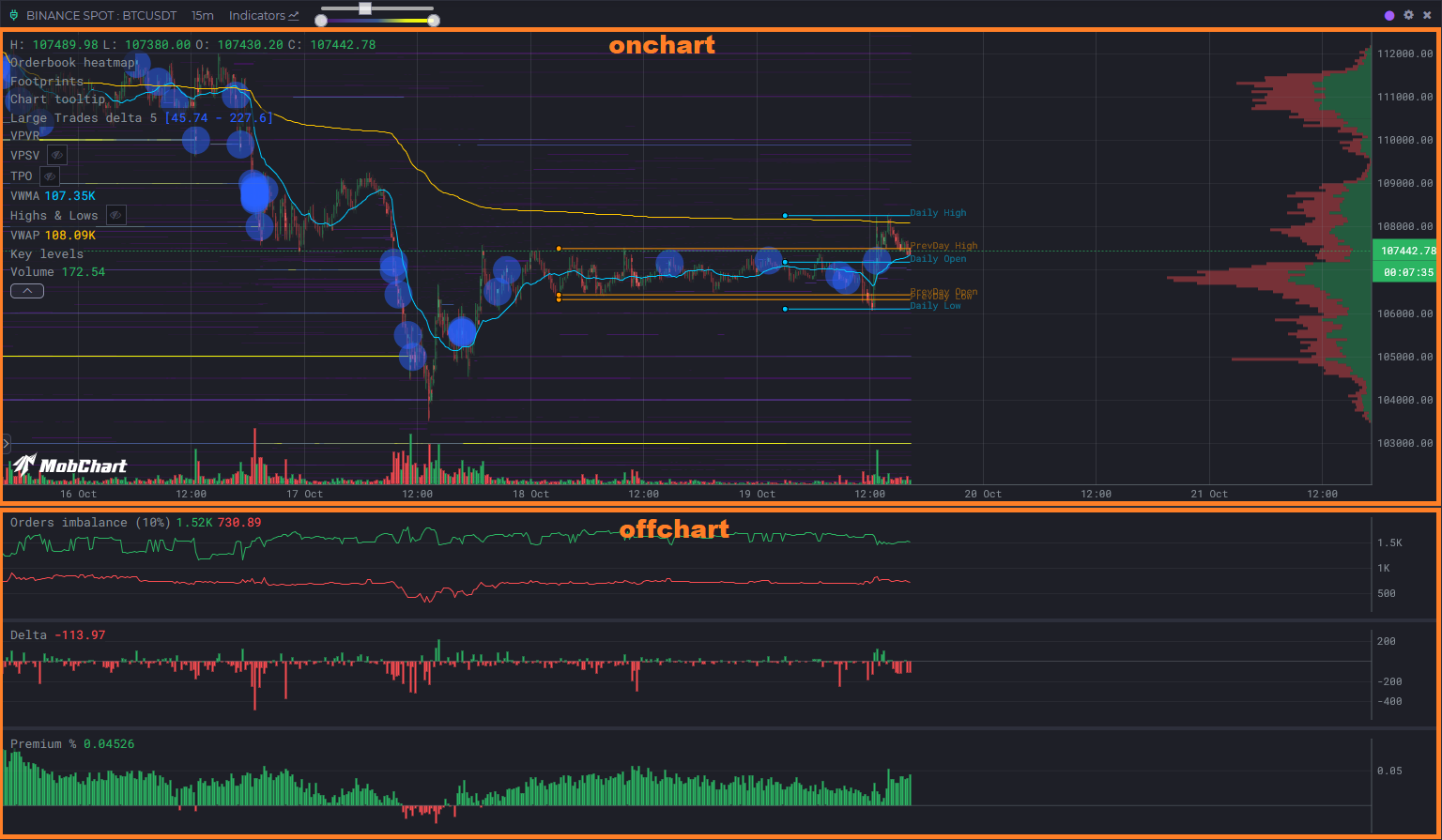
type | 'onchart' | 'offchart' | 指标位置(图表上或单独面板中) |
isPublic | true | false | 指标是否公开 |
isPublicCode | true | false | 源代码是否公开 |
options | object(可选) | { fullRange, warmup },见下文 |
示例:
define("My Indicator", "Shows EMA line", "onchart", true, false);
计算范围。 默认情况下,脚本只计算图表中需要计算的部分:向左滚动时加载的K线,或刷新时的最新K线,再加上它们之前 warmup 根历史K线(默认 500),这些K线参与计算但不会返回。当指标需要更多或更少的历史数据时,请声明 warmup,例如 EMA(200) 使用 { warmup: 200 }。如果脚本的数值或图形依赖于 整个可见范围(从第一根可见K线开始的 VWAP、累计 delta、窗口最高点处的标签、横跨整个图表的水平位),则必须声明 { fullRange: true },否则在加载更多历史后结果会出错。每次保存脚本时都会从 define() 读取该模式:未声明 fullRange 保存的脚本按部分方式计算,因此编辑现有的累计类脚本时请加上该标志。部分计算的脚本也会分段加载:在较长的历史上启用时,图表会先请求最新的 500 根K线(若 warmup 更大则请求 warmup 根),较早的部分随后逐个请求,因此可见部分会立即显示。带 fullRange 的脚本始终在整个范围上通过单次请求计算。
define("Window max", "Label at the highest visible high", "onchart", true, true, { fullRange: true });
onchart 和 offchart 的指标位置:
输入参数
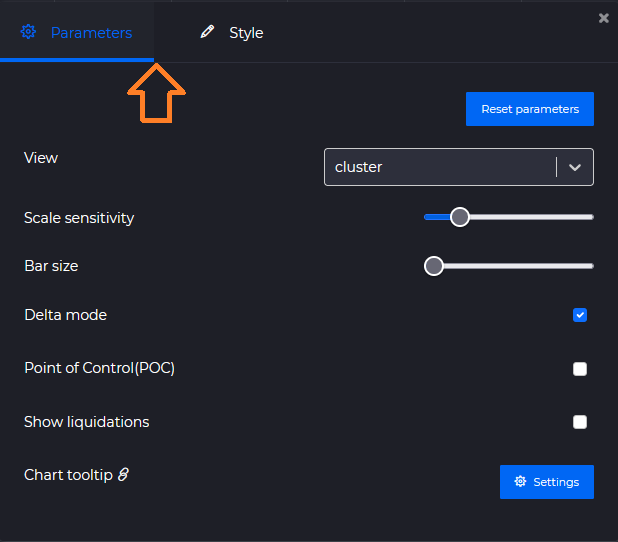
input 和 style 类用于创建用户可配置的设置(类似 PineScript 中的 input())。
| 方法 | 说明 |
|---|---|
number(title, defaultValue, min, max, step) | 数值输入 |
range(title, defaultValue, min, max, step) | 范围输入 |
select(title, defaultValue, values) | 下拉选择 |
color(title, defaultValue) | 颜色选择器 |
boolean(title, defaultValue) | 布尔输入 |
主要参数示例(input):
const length = input.number("Period", 14, 1, 100, 1);const type = input.select("Type", 'sma', ['sma', 'ema']);const color = input.color("Line Color", "#FF0000");
或视觉参数(style):
const length = style.number("Size", 14, 1, 100, 1);const color = style.select("Background Color", '#FF0000', ["#FF0000", "#AA0000", "#BB0000"]);const color = style.color("Background Color", "#FF0000");
数据源
source 类从服务器获取市场数据。基于K线的方法使用相同的参数;两个实时快照方法不同:orderbook() 接收交易所和交易对,levels() 接收交易所和设置对象。
| 参数 | 说明 |
|---|---|
exchange, ticker, timeframe | 默认为打开该指标的图表。传入其他值可获取其他市场的数据。 |
lookback | 从当前日期起的历史K线数量,不超过 5000。 |
ohlcv(exchange, ticker, timeframe, lookback?)
K线数据。
[{"open": 115886.17,"high": 115911.96,"low": 115764.27,"close": 115815.16,"volume": 228.41528,"startTime": 1757699100000},{...},...]
depths(exchange, ticker, timeframe, lookback?)
历史订单簿快照,每根K线一个。只保存最大的限价单(即热力图背后的数据)。
[{"data": {"asks": {"109425": 5.467,"109495": 3.564,...},"bids": {"33000": 3.746,"35000": 16.49,...}},"startTime": 1757699100000},{...},...]
clusters(exchange, ticker, timeframe, lookback?)
集群(足迹图)数据:K线每个价格档位上的买入和卖出成交量。
[{"data": {"totalBuy": 16053385,"totalSell": 20490989,"0.8654": { "buy": 286845, "sell": 336689 },"0.8653": { "buy": 271848, "sell": 259167 },"0.8652": { "buy": 318814, "sell": 373497 },...},"startTime": 1757699100000},{...},...]
liquidations(exchange, ticker, timeframe, lookback?)
K线每个价格档位上的强平成交量(仅限合约市场)。格式与 clusters() 相同。
[{"data": {"totalBuy": 16053385,"totalSell": 20490989,"0.8654": { "buy": 286845, "sell": 336689 },"0.8653": { "buy": 271848, "sell": 259167 },"0.8652": { "buy": 318814, "sell": 373497 },...},"startTime": 1757699100000},{...},...]
moreData(exchange, ticker, timeframe, lookback?)
每根K线的衍生品数据:资金费率、未平仓合约K线、多空比(仅限合约市场)。
[{"data": {"FR": 0.00003777, // 资金费率"OI": { // 未平仓合约K线"open": 85645.708,"close": 83496.225,"high": 85801.04,"low": 83397.918},"LS": { "l": 0.5426, "s": 0.4574 }, // 多空比"taLS": { "l": 0.552, "s": 0.448 }, // 大户账户多空比"tpLS": { "l": 0.5996, "s": 0.4004 } // 大户持仓多空比},"startTime": 1757699100000},{...},...]
orderbook(exchange, ticker)
实时订单簿快照:当前的完整订单簿,不与K线绑定。
{"asks": {"109425": 5.467,"109495": 3.564,...},"bids": {"109400": 1.2,"109390": 0.8,...}}
价格档位未排序,请使用 ta 的订单簿辅助函数(ta.bestBid、ta.sumBids 等)处理订单簿。
K线的历史订单簿来自 depths():depths()[i].data 格式相同,但其中只保存最大的限价单。
示例:
const candles = source.ohlcv(); // exchange、ticker 和 timeframe 参数默认为当前图表。const closes = candles.map(c => c.close);
levels(exchange, settings?)
流动性筛选器 的价位:某交易所挂着的大额限价单,使用与筛选器页面相同的设置进行过滤。实时数据,不与K线绑定。没有订阅计划时,距离限制为 1%,存续时间限制为 60 分钟,结果限制为 200 个价位;有订阅计划时最多 2000 个价位。最大的订单排在最前。计为一次数据源请求。
{"BTCUSDT": {"asks": {"109500": {"price": 109500,"quantity": 42.5, // 以基础资产计的数量"quantityUSDT": 4653750, // 以计价货币计的数量"distance": 0.62, // 与当前价格的距离,百分比"duration": 184, // 订单已挂单的分钟数"touches": 2,"currentTouches": 1,"filledPercent": 12.4,"strength": 95.5, // 百分比,参见筛选器"diversity": 11,"isContinuous": true,"date": "2026-10-10T06:12:03.000Z"},...},"bids": { ... },"volume1hTotal": 183000000},...}
设置(均为可选):
| 设置 | 默认值 | 说明 |
|---|---|---|
tickers | 所有交易对 | 仅限该交易所的这些交易对 |
exclude | [] | 要跳过的交易对 |
type | "all" | "all"、"bids" 或 "asks" |
nearness | 5 | 与当前价格的最大距离,百分比 |
size | 100000 | 以计价货币计的最小订单规模 |
lifespan | 0 | 订单已挂单的最少分钟数 |
touches, currentTouches | 0 | 价位 / 当前订单的最少触及次数 |
filled | 0 | 订单已成交部分的最小值,百分比 |
strength, diversity | 0 | 最小强度(百分比)和多样性,与筛选器相同 |
continuousOnly | false | 跳过消失后又重新出现的订单 |
volume1h | 0 | 交易对 1 小时成交量的最小值,以计价货币计 |
spotAndFutures | false | 仅限同时存在于现货和合约市场的交易对 |
limit | 500 | 价位的最大数量,最大的在前(最多 2000) |
示例:
// 将图表市场价格附近的大单绘制为水平线,并标注数量和存续时间const candles = await source.ohlcv();const lastDate = candles.at(-1).startTime;const levels = await source.levels(currentExchange, { tickers: [currentTicker], nearness: 3, size: 300000, lifespan: 30 });const own = levels[currentTicker] || { asks: {}, bids: {} };for (const [type, color] of [["asks", "#ef5350"], ["bids", "#26a69a"]]) {for (const [price, level] of Object.entries(own[type])) {plot.horizontalLine(`${type} ${price}`, +price, color, 0.8, Math.min(4, 1 + level.quantityUSDT / 1e6));plot.text(`${type} ${price} label`, `${(level.quantityUSDT / 1e6).toFixed(2)}M · ${level.duration}m`, lastDate, +price, 10, color);}}
HTTP 请求
http 类向外部 HTTP API 发送请求并返回响应,使指标可以使用 source 中没有的数据:你自己的服务器、公共 REST API、链上指标提供商等。
与 source.* 一样,这些调用以同步函数的形式编写,无需 await。
| 方法 | 说明 |
|---|---|
get(url, options?) | GET 请求 |
post(url, body?, options?) | POST 请求。对象或数组形式的 body 以 JSON 发送(Content-Type: application/json),字符串按原样发送 |
options 为 { headers: { name: value } } — 最多 10 个自定义请求头(例如 Authorization 或 x-api-key)。
两个方法返回相同的响应对象,且 从不抛出异常:
{ok: true, // 状态码 200–299status: 200, // HTTP 状态码,请求未发送时为 0headers: { "content-type": "application/json", ... },data: { ... }, // 解析为 JSON 的响应体,响应体不是 JSON 时为 nulltext: "...", // 原始响应体error: null // 请求失败的原因:"timeout"、"url not allowed"、"too many requests" 等}
可能的 error 值:invalid url、url not allowed、invalid headers、invalid body、body too large、response too large、timeout、too many requests、rate limit、busy、proxy unavailable、network error。
示例(GET):
define("Fear & Greed", "Crypto Fear & Greed index", "offchart", true, true);const res = http.get("https://api.alternative.me/fng/?limit=30");if (!res.ok) logger.log("request failed:", res.status, res.error);// res.data = { data: [{ value: "71", timestamp: "1757635200" }, ...] }const byDay = {};(res.data?.data || []).forEach((row) => { byDay[Number(row.timestamp) * 1000] = Number(row.value); });const candles = source.ohlcv();const values = candles.map((c) => c ? byDay[c.startTime - (c.startTime % 86400000)] ?? null : null);plot.lineSeries("Fear & Greed", values, "#00C8FF");
示例(POST):
const candles = source.ohlcv();const last = candles.at(-1);const res = http.post("https://example.com/api/signals",{ exchange: currentExchange, ticker: currentTicker, close: last.close },{ headers: { "x-api-key": "YOUR_KEY" } } // 仅限私有代码);logger.log("signal sent:", res.ok, res.status, res.data);
全局变量
| 变量 | 说明 | 示例 |
|---|---|---|
currentExchange | 图表当前的交易所 | binance, binanceFutures, coinbase, ... |
currentTicker | 图表当前的交易对(格式取决于交易所) | BTCUSDT, ADA-USD, BTC/USDC, ... |
currentTimeframe | 图表当前的周期 | 1m, 5m, 15m, ... |
示例:
const candles = source.ohlcv(currentExchange, currentTicker, currentTimeframe);const closes = candles.map(c => c.close);
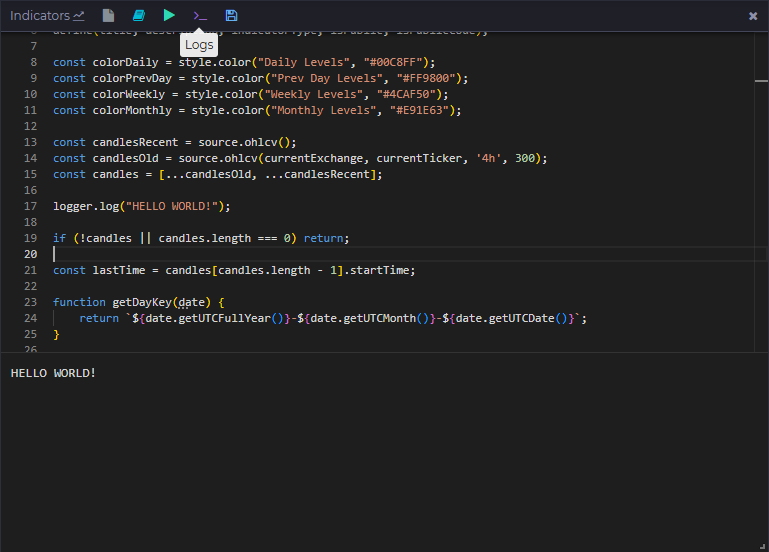
日志
logger 类用于输出信息和调试。
| 方法 | 说明 |
|---|---|
log(...args) | 向日志添加一条记录(有长度和数量限制) |
示例:
const candles = source.ohlcv();logger.log("First candle:", candles?.[0]);
可视化
plot 类负责绘制图形元素和数据序列。
几何图形
| 方法 | 说明 |
|---|---|
box(title, date1, price1, date2, price2, fill, opacity, stroke, strokeOpacity, strokeWidth) | 矩形 |
square(title, date1, price1, size, fill, opacity, stroke, strokeOpacity, strokeWidth) | 正方形 |
diamond(title, date1, price1, size, fill, opacity, stroke, strokeOpacity, strokeWidth) | 菱形 |
triangle(title, date1, price1, size, fill, opacity, stroke, strokeOpacity, strokeWidth) | 三角形 |
circle(title, date1, price1, radius = 10, fill, opacity, stroke, strokeOpacity, strokeWidth) | 圆形 |
text(title, value, date1, price1, fontSize, fill, opacity) | 图表上的文字 |
table(title, rows, options) | 固定在图表角落的表格,参见 表格 |
straightLine(title, date1, price1, date2, price2, stroke, strokeOpacity, strokeWidth, strokeDasharray) | 直线 |
horizontalLine(title, price1, stroke, strokeOpacity, strokeWidth, strokeDasharray) | 横贯整个图表的水平线 |
verticalLine(title, date1, stroke, strokeOpacity, strokeWidth, strokeDasharray) | 纵贯整个图表的垂直线 |
| 参数 | 数据类型 | 说明 |
|---|---|---|
title | string | 元素名称(图表上的唯一标识) |
date1 | number(时间戳,毫秒) | 起始时间戳 |
price1 | number | 起始价格(Y 轴坐标) |
date2 | number(时间戳,毫秒) | 结束时间戳(用于线和矩形) |
price2 | number | 结束价格(用于线和矩形) |
size | number | 图形尺寸(像素) |
radius | number | 圆的半径(默认 10) |
fill | string(hex,例如 "#FF0000") | 图形填充颜色 |
opacity | number(0–1) | 填充不透明度 |
stroke | string(hex,例如 "#000000") | 描边颜色 |
strokeOpacity | number(0–1) | 描边不透明度 |
strokeWidth | number | 描边宽度(像素) |
strokeDasharray | array(例如 [5,5]) | 虚线样式 |
fontSize | number | 文字大小(像素) |
value | string | 文字内容(用于 text 方法) |
示例:
plot.text("Text object", "Hello world!", 1757699100000, 115000, 10, "#00C8FF", 0.5);plot.straightLine(`${namePrefix} Open`, level.timeStart, level.open, level.timeEnd, level.open, color);plot.circle(`${namePrefix} High`, level.timeStart, level.high, 3, color);
图表上最多可显示 3000 个图形。
数据序列
| 方法 | 说明 |
|---|---|
lineSeries(title, values, stroke, strokeOpacity, strokeWidth, strokeDasharray) | 折线图 |
barSeries(title, values, fill, opacity) | 柱状图 |
candleSeries(title, openValues, closeValues, highValues, lowValues, fill, opacity) | K线 |
areaSeries(title, values, fill, opacity, stroke, strokeOpacity, strokeWidth, base) | 线与 base(默认:图表底部)之间的填充区域 |
bandSeries(title, upperValues, lowerValues, fill, opacity, stroke, strokeOpacity, strokeWidth, step) | 两条序列之间的填充带,每根K线保留各自的颜色和不透明度 |
profile(title, values, options) | 可见K线的成交量分布式直方图,参见 分布图 |
histogram(title, rows, options) | 以分布图形式绘制的现成价格映射,参见 直方图 |
| 参数 | 数据类型 | 说明 |
|---|---|---|
values, upperValues, lowerValues | (number \| null)[] | 每根K线一个值,null 隐藏该K线 |
fill, stroke | string(hex)或 function | 颜色,或返回该K线颜色的函数:lineSeries、barSeries、candleSeries 和 areaSeries 为 (value, i),bandSeries 为 (upper, lower, i) |
opacity | number(0–1)或 function | 填充不透明度,areaSeries / bandSeries 可用函数 (value, i) / (upper, lower, i) |
base | number | null | areaSeries 的基准线,null = 图表底部 |
step | boolean | bandSeries 样式:true = 每根K线一列(默认),false = 连续多边形 |
示例:
plot.lineSeries("EMA", ta.ema(closes, 20), "#00C8FF");// 每根K线保留各自的颜色:收盘价高于 EMA 为绿色,低于为红色plot.lineSeries("Close", closes, (v, i) => v > ema[i] ? colorBuy : colorSell);plot.barSeries("Premium %", premiumPercents, ((d) => d > 0 ? color1 : color2), 1);plot.candleSeries("Candles",opens, closes, highs, lows,(v, i) => {return opens?.[i] > closes?.[i] ? colorBuy : colorSell});plot.areaSeries("Volume", volumes, "#00C8FF", 0.3);// 按K线着色的区域,K线越大越不透明plot.areaSeries("Delta", deltas, (v, i) => v >= 0 ? colorBuy : colorSell, (v, i) => Math.min(1, Math.abs(v) / maxDelta));// 收盘价与其下方 1% 之间的压力带,按该K线的失衡比率着色和设置透明度plot.bandSeries("Bid pressure",closes,closes.map(c => c * 0.99),(upper, lower, i) => ratios[i] > 0 ? bidColor : askColor,(upper, lower, i) => Math.abs(ratios[i]) / 100);
图表上最多可显示 20 条数据序列。
分布图
plot.profile(title, values, options?) 按价格绘制直方图,类似内置的成交量分布。values[i] 是 ohlcv() 第 i 根K线的价格映射:{ price: value } 或 { price: { buy, sell } }(可以直接传入 clusters() 或 liquidations() 记录的 data),没有数据行的K线为 null。图表上可见的K线 的数据行由图表本身按价格步长汇总,因此分布图会跟随平移、缩放和加载更多,无需重新运行。单个值用一种颜色绘制(负值使用 fill2),买卖对会将柱子分为买入和卖出两部分,并支持 delta 模式。profile() 不返回提醒句柄。
| 选项 | 默认值 | 说明 |
|---|---|---|
step | 图表最小价格变动 | 行高(价格单位),价格向下取整到该值 |
orient | "right" | 柱子生长的起始边,"right" 或 "left" |
width | 30 | 最宽一行占图表宽度的百分比 |
fill | "#26a69a" | 数值或买入部分的颜色 |
fill2 | "#ef5350" | 卖出部分的颜色 |
opacity | 0.6 | 柱子不透明度 |
delta | false | 绘制 buy - sell 而非总和,仅限买卖对 |
poc | true | 在数值最大的一行处画线 |
valueArea | 70 | POC 周围以完全不透明绘制的总量百分比,false 表示禁用 |
valueAreaOpacity | 0.3 | 价值区域之外各行的不透明度 |
labels | true | 空间足够时在柱子上显示行合计 |
限制:每次运行 3 个分布图,每根K线 300 行,每个分布图 200000 行。超出限制的行会被丢弃,运行日志中会记录一条说明。
示例:
// 图表的成交量分布,与内置工具效果相同const rows = await source.clusters();plot.profile("Volume", rows.map((r) => r?.data ?? null), { step: 5 });// 仅大额成交,按 delta 着色,位于左侧边缘const minSize = input.number("Min trade size", 50, 0, 100000, 1);const big = rows.map((r) => {if (!r?.data) return null;const out = {};for (const [price, c] of Object.entries(r.data)) {if (price === "totalBuy" || price === "totalSell") continue;if (c.buy + c.sell >= minSize) out[price] = { buy: c.buy, sell: c.sell };}return out;});plot.profile("Large trades", big, { step: 5, delta: true, orient: "left" });
直方图
plot.histogram(title, rows, options?) 绘制你已经构建好的直方图:整个图表只有一个价格映射,不会从K线中汇总任何数据。当数据行属于各根K线且图形应跟随可见范围时使用 profile();当数据行是最终结果时使用 histogram():订单簿快照、脚本计算出的价位、其他市场的数据。
rows 的格式与 profile() 的单根K线条目相同:{ price: value }、{ price: { buy, sell } } 或 [price, buy, sell] 行的列表。单个值用一种颜色绘制(负值使用 fill2),买卖对会将柱子分为买入和卖出两部分,并支持 delta 模式。选项与 profile() 相同,参见上表。
直方图以本次运行的最后一根K线作为日期,图表保留每个标题 最新 的直方图,因此针对较早K线的部分运行(加载历史时)永远不会替换当前的直方图。每次脚本刷新时都会重绘,因此订单簿直方图会跟随实时订单簿。histogram() 不返回提醒句柄。
限制:每次运行 3 个直方图,5000 行。超出限制的行会被丢弃,运行日志中会记录一条说明。
示例,订单簿:
// 将实时订单簿作为右侧边缘的分布图:买盘用买入颜色,卖盘用卖出颜色const book = await source.orderbook();const rows = {};for (const [price, qty] of Object.entries(book.bids)) rows[price] = { buy: qty };for (const [price, qty] of Object.entries(book.asks)) rows[price] = { sell: qty };plot.histogram("Order book", rows, { step: 5, width: 25, valueArea: false, poc: false });
示例,自定义价位:
// 自定义直方图:最近 100 根K线的集群成交量,越近的K线权重越大const rows = await source.clusters();const weighted = {};rows.slice(-100).forEach((r, i, arr) => {if (!r?.data) return;const weight = (i + 1) / arr.length;for (const [price, c] of Object.entries(r.data)) {if (price === "totalBuy" || price === "totalSell") continue;const cell = weighted[price] || (weighted[price] = { buy: 0, sell: 0 });cell.buy += (c.buy || 0) * weight;cell.sell += (c.sell || 0) * weight;}});plot.histogram("Weighted volume", weighted, { step: 5, orient: "left", delta: true });
表格
plot.table(title, rows, options?) 绘制一个固定在图表面板角落的小网格:多周期汇总、已加载范围的统计、信号面板。rows 是行数组,每行是单元格数组,单元格可以是字符串、数字或 { text, color, bg, align, bold }。同一角落的表格按顺序堆叠。表格以本次运行的最后一根K线作为日期,图表保留每个标题 最新 的表格,因此针对较早K线的部分运行(加载历史时)永远不会替换当前的表格。宽度小于 500 px 的图表上不绘制表格。表格可以用鼠标拖动:位置随工作区保存,当脚本更改其 position 选项时重置。table() 不返回提醒句柄。
| 选项 | 默认值 | 说明 |
|---|---|---|
position | "top-right" | 面板角落:"top-right"、"top-left"、"bottom-right"、"bottom-left" |
header | false | 第一行加粗并绘制在阴影条上 |
fontSize | 11 | 文字大小(px),8 到 16 |
color, bg, border | 随主题 | 默认的文字、面板和网格颜色;单元格可以覆盖 color 和 bg |
opacity | 0.85 | 面板不透明度 |
align | "left" | 默认单元格对齐方式,"left"、"center" 或 "right" |
限制:每次运行 3 个表格,50 行,10 列,每个单元格 100 个字符。更长的文本会被截断并显示省略号,一列最多占图表宽度的 30%。
示例:
const candles = await source.ohlcv();const closes = candles.map((c) => c.close);const rsi = ta.rsi(closes, 14);const last = rsi.at(-1);const change = (closes.at(-1) / closes.at(-25) - 1) * 100;plot.table("Stats", [["Metric", "Value"],["RSI 14", { text: last.toFixed(1), color: last > 70 ? "#ef5350" : last < 30 ? "#26a69a" : undefined }],["Change 24 bars", { text: change.toFixed(2) + "%", align: "right" }],["Volume", candles.slice(-24).reduce((s, c) => s + c.volume, 0).toFixed(0)],], { position: "top-right", header: true });
技术分析
ta 类实现了 PineScript v5 的 ta.* 函数。Pine 逐根K线计算,而这里的每个函数都接收完整的序列(数组,每根K线一个值,从旧到新),并返回相同长度的序列,可直接绘制。在周期尚未填满时值为 null,null 输入会像 Pine 的 na 一样传播。隐式读取 high、low、close 或 volume 的 Pine 函数在这里将这些数组作为参数传入。
返回多条序列的函数(bb、kc、macd、stoch、dmi、supertrend)返回一个同时带有命名属性的数组:const [middle, upper, lower] = ta.bb(closes, 20, 2) 或 ta.bb(closes, 20, 2).upper。
辅助函数
| 方法 | 说明 |
|---|---|
highest(values, length) / lowest(values, length) | length 根K线内的最高 / 最低值 |
highestbars(values, length) / lowestbars(values, length) | 到最高 / 最低K线的偏移量(0 或负数) |
max(values) / min(values) | 截至每根K线的历史最高 / 最低值 |
range(values, length) | highest - lowest |
change(values, length = 1) | values[i] - values[i - length] |
mom(values, length) | 动量 |
roc(values, length) | 变化率,% |
cum(values) | 累计和 |
rising(values, length) / falling(values, length) | 值高于 / 低于之前 length 个值中的每一个 |
variance(values, length, biased = true) | 方差 |
stdev(values, length, biased = true) | 标准差 |
dev(values, length) | 平均绝对偏差 |
median(values, length) | 中位数 |
mode(values, length) | 众数(出现次数相同时取最小值) |
percentile_linear_interpolation(values, length, percentage) | 百分位数,在两个最近排名之间线性插值 |
percentile_nearest_rank(values, length, percentage) | 百分位数,最近排名法 |
percentrank(values, length) | 之前 length 个值中小于或等于当前值的百分比 |
correlation(series1, series2, length) | 相关系数 |
crossover(series1, series2) | 向上交叉(任一参数都可以是数字:ta.crossover(rsi, 70)) |
crossunder(series1, series2) | 向下交叉 |
cross(series1, series2) | 任意交叉 |
barssince(condition) | 距 condition(布尔数组)上次为真的K线数 |
valuewhen(condition, values, occurrence = 0) | condition 在第 occurrence 次之前为真时 values 的值 |
pivothigh(values, leftbars, rightbars) / pivotlow(...) | 确认K线上的枢轴值,枢轴本身位于 rightbars 根K线之前 |
移动平均线
| 方法 | 说明 |
|---|---|
sma(values, length) | 简单移动平均线 |
ema(values, length) | 指数移动平均线 |
rma(values, length) | Wilder 移动平均线(RSI / ATR 使用) |
wma(values, length) | 加权移动平均线 |
hma(values, length) | Hull 移动平均线 |
alma(values, length, offset = 0.85, sigma = 6, floor = false) | Arnaud Legoux 移动平均线 |
swma(values) | 4 根K线的对称加权移动平均线 |
vwma(values, volumes, length) | 成交量加权移动平均线 |
linreg(values, length, offset = 0) | 线性回归曲线 |
振荡指标
| 方法 | 说明 |
|---|---|
rsi(values, length) | 相对强弱指数 |
cmo(values, length) | 钱德动量摆动指标 |
cog(values, length) | 重心指标 |
mfi(values, volumes, length) | 资金流量指数(values 通常为 hlc3) |
tsi(values, shortLength, longLength) | 真实强度指数,-1..1 |
wpr(highs, lows, closes, length) | 威廉指标 %R |
stoch(highs, lows, closes, period = 14, smoothK = 3, smoothD = 3) | 随机指标 [k, d],smoothK = 1 得到原始值 |
cci(values, length) / cci(highs, lows, closes, length) | 顺势指标(第二种形式基于典型价格) |
macd(values, fast = 12, slow = 26, signalPeriod = 9) | MACD [macd, signal, histogram] |
通道与带状指标
| 方法 | 说明 |
|---|---|
bb(values, length = 20, mult = 2) / bollinger(...) | 布林带 [middle, upper, lower] |
bbw(values, length, mult) | 布林带宽度 (upper - lower) / middle |
kc(values, highs, lows, closes, length = 20, mult = 2, useTrueRange = true) | 肯特纳通道 [middle, upper, lower] |
kcw(values, highs, lows, closes, length, mult, useTrueRange) | 肯特纳通道宽度 (upper - lower) / middle |
趋势与波动率
| 方法 | 说明 |
|---|---|
tr(highs, lows, closes, handleNa = false) | 真实波幅(handleNa = true 时第一根K线为 high - low) |
atr(highs, lows, closes, period = 14) | 平均真实波幅 |
dmi(highs, lows, closes, diLength = 14, adxSmoothing = 14) | 趋向指标 [plus, minus, adx] |
adx(highs, lows, closes, period = 14) | 平均趋向指数 |
sar(highs, lows, closes, start = 0.02, inc = 0.02, max = 0.2) | 抛物线 SAR |
supertrend(highs, lows, closes, factor = 3, atrPeriod = 10) | 超级趋势 [supertrend, direction],direction -1 = 上升趋势,1 = 下降趋势 |
成交量
| 方法 | 说明 |
|---|---|
vwap(values, volumes, anchor?) / vwap(highs, lows, closes, volumes, anchor?) | 累计 VWAP(第二种形式基于典型价格),在 anchor(布尔数组)为真的K线上重新开始 |
obv(closes, volumes) | 能量潮 |
accdist(highs, lows, closes, volumes) | 累积 / 派发 |
iii(highs, lows, closes, volumes) | 日内强度指数 |
pvt(closes, volumes) | 量价趋势 |
nvi(closes, volumes) / pvi(closes, volumes) | 负 / 正成交量指数 |
wad(highs, lows, closes) | 威廉累积 / 派发 |
wvad(opens, highs, lows, closes, volumes) | 威廉变异累积 / 派发 |
订单簿辅助函数
orderbook 为 source.orderbook() 或 source.depths()[i].data:{asks: {price: quantity}, bids: {price: quantity}}。
| 方法 | 说明 |
|---|---|
orderbookSide(orderbook, side) | 一侧('bids' / 'asks')作为 [[price, quantity], ...],按最优价格优先排序 |
bestBid(orderbook) / bestAsk(orderbook) | 最优买价 / 卖价(空订单簿为 null) |
sumBids(orderbook, percent, price, inQuote) | price(默认:最优买价)与 price * (1 - percent / 100) 之间的累计买盘数量,inQuote = true 时累加 price * quantity |
sumAsks(orderbook, percent, price, inQuote) | price(默认:最优卖价)与 price * (1 + percent / 100) 之间的累计卖盘数量 |
示例:
const candles = source.ohlcv();const closes = candles.map(c => c.close);const rsiValues = ta.rsi(closes, 14);plot.lineSeries("RSI", rsiValues, "#00C8FF");
提醒
用户可以在图表上指标设置的 提醒 选项卡中为你的指标创建提醒。 提醒会在服务器端定期检查,通知发送到 Telegram 和/或用户定义的 Webhook URL。
提醒设置 — alertInput
alertInput 类声明提醒设置。它的用法与 input 完全相同,但字段显示在 提醒 选项卡中,每个用户都为自己的提醒配置各自的值。
没有 alertInput 声明的脚本无法用于提醒。
| 方法 | 说明 |
|---|---|
number(title, defaultValue, min, max, step) | 数值输入 |
range(title, defaultValue, min, max, step) | 范围输入 |
select(title, defaultValue, values) | 下拉选择 |
color(title, defaultValue) | 颜色选择器 |
boolean(title, defaultValue) | 布尔输入 |
示例:
const alertVolumeThreshold = alertInput.number("Volume threshold", 1000, 0, 10000000, 1);
触发提醒 — alert.fire
| 方法 | 说明 |
|---|---|
fire(title, message, date) | 触发提醒通知 |
- 三个参数都是 必需的 — 缺少
title、message或date的调用会被跳过(并在日志中写入警告)。 - 保持提醒 标题固定,不要生成唯一标题。每个标题每次运行只触发一次(每次运行最多 20 个标题)。
date是信号所属K线的startTime:同一标题只有在针对 更新的 K线触发时才会再次通知。早于用户创建提醒时刻的K线信号会被忽略(防刷屏)。
示例:
if (candle.volume > alertVolumeThreshold) {alert.fire("High volume", `vol ${candle.volume}`, candle.startTime);}
图形提醒 — plot.<shape>(...).alert(...)
所有几何图形(box、square、diamond、triangle、circle、straightLine、horizontalLine、verticalLine、text)都返回一个带有 .alert() 方法的句柄。
提醒会自动使用图形的 date1 触发,因此防刷屏逻辑无需额外代码即可生效 — 这是针对逐根K线信号的推荐方式。
两种形式:
// 简单形式:每当图形针对新日期绘制时触发plot.box(...).alert("High volume", `vol ${candle.volume}`);// 回调形式:不返回任何内容则跳过,返回 [title, message] 则触发plot.box(...).alert((shape) => {if (candle.volume > alertVolumeThreshold)alert.fire("High volume", `vol ${candle.volume}`, candle.startTime);});
回调接收图形数据(date1、price1、date2、price2 等)。
序列提醒 — plot.<series>(...).alert(...)
数据序列(lineSeries、barSeries、candleSeries、areaSeries、bandSeries)同样返回 .alert() 句柄。
回调接收 最新的数据点 和最新K线的日期,提醒以该日期触发。
lineSeries/barSeries/areaSeries— 回调接收最后一个 值(数字)candleSeries— 回调接收最后一根K线{open, close, high, low}bandSeries— 回调接收最后的{upper, lower}
plot.lineSeries("RSI", rsiValues, color).alert((rsi, date) => {if (rsi > alertRsiThreshold) alert.fire("RSI high", `RSI ${rsi.toFixed(1)}`, latestCandle.startTime);});
持续为真的条件在每根 新K线 上通知一次。对于一次性信号,请使用交叉类条件(ta.crossover)。
完整示例
const title = "Volume alerts";const description = "Shows boxes on high-volume candles";define(title, description, "onchart", true, true);const color = style.color("Color", "#00C8FF");const volumeThreshold = input.number("Volume threshold", 1000, 0, 10000000, 1);const alertVolumeThreshold = alertInput.number("Alert volume threshold", 5000, 0, 10000000, 1);const alertCloseThreshold = alertInput.number("Alert close threshold", 100000, 0, 10000000, 1);const candles = source.ohlcv();const latestCandle = candles.at(-1);const closes = candles.map(c => c.close);// 序列提醒:检查最新收盘价plot.lineSeries("Closes", closes, color).alert((close, date) => {if (close > alertCloseThreshold) alert.fire("Close above threshold", `close ${close}`, latestCandle.startTime);});for (let i = 0; i < candles.length; i++) {const candle = candles[i];if (candle.volume > volumeThreshold) {const right = i < candles.length - 1 ? candles[i + 1].startTime : candle.startTime + 60000;// 图形提醒:与用户的提醒阈值进行比较plot.box(`Volume ${i}`, candle.startTime, candle.high, right, candle.low, "#00C8FF", 0.3).alert(() => {if (candle.volume > alertVolumeThreshold)alert.fire("High volume", `vol ${candle.volume}`, candle.startTime);});}}
指标示例
const title = "Your first indicator";const description = "Shows closes lines on the chart";const indicatorType = "onchart";define(title, description, indicatorType, true, true);const color = input.color("Line Color", "#00C8FF");const candles = source.ohlcv();const closes = candles.map(c => c.close);plot.lineSeries("Closes", closes, color);
define("Example Indicator", "Demonstrates basic plotting", "onchart", true, true);const color = input.color("Line Color", "#00FF99");const candles = source.ohlcv();const closes = candles.map(c => c.close);const ema20 = ta.ema(closes, 20);plot.lineSeries("EMA 20", ema20, color);
const title = "Colored Volume Bars";const description = "Volumes colored based on candle direction.";const indicatorType = "onchart";const isPublic = true;const isPublicCode = true;define(title, description, indicatorType, isPublic, isPublicCode);// 获取 OHLC K线const candles = source.ohlcv();const colorUp = style.color("Color 1", "#2BB462"); // 上涨使用的绿色const colorDown = style.color("Color 2", "#FB4C51"); // 下跌使用的红色const volumes = candles.map(candle => candle.volume);plot.barSeries("Volume", volumes, (value, index) => {const currentCandle = candles[index];return currentCandle.close >= currentCandle.open ? colorUp : colorDown;});
define('Coinbase Premium Index', 'Coinbase Premium Index', 'offchart', true, false);const color1 = style.color("Color 1", "#2BB462");const color2 = style.color("Color 2", "#FB4C51");// 获取 OHLC K线const cbCandles = source.ohlcv('coinbase', 'BTC-USD');const binanceCandles = source.ohlcv('binance', 'BTCUSDT');// 提取收盘价const cbCloses = cbCandles.map(c => c.close);const binanceCloses = binanceCandles.map(c => c.close);// --- Coinbase 溢价指数计算 ---const premiumPercent = cbCloses.map((cb, i) => {const b = binanceCloses[i];return ((cb - b) / b) * 100;});// 绘制溢价指数plot.barSeries("Premium %", premiumPercent, ((d) => d > 0 ? color1 : color2)) // 百分比差值
const title = "Candles";const description = "Simple candles draw";const indicatorType = "offchart";const isPublic = true;const isPublicCode = true;define(title, description, indicatorType, isPublic, isPublicCode);const colorBuy = style.color("Buy Color", "#2BB462");const colorSell = style.color("Sell Color", "#7a3d3f");const candles = source.ohlcv();const closes = candles.map(c => c.close);const opens = candles.map(c => c.open);const highs = candles.map(c => c.high);const lows = candles.map(c => c.low);plot.candleSeries("Candles",opens, closes, highs, lows,(v, i) => {return opens?.[i] > closes?.[i] ? colorBuy : colorSell});
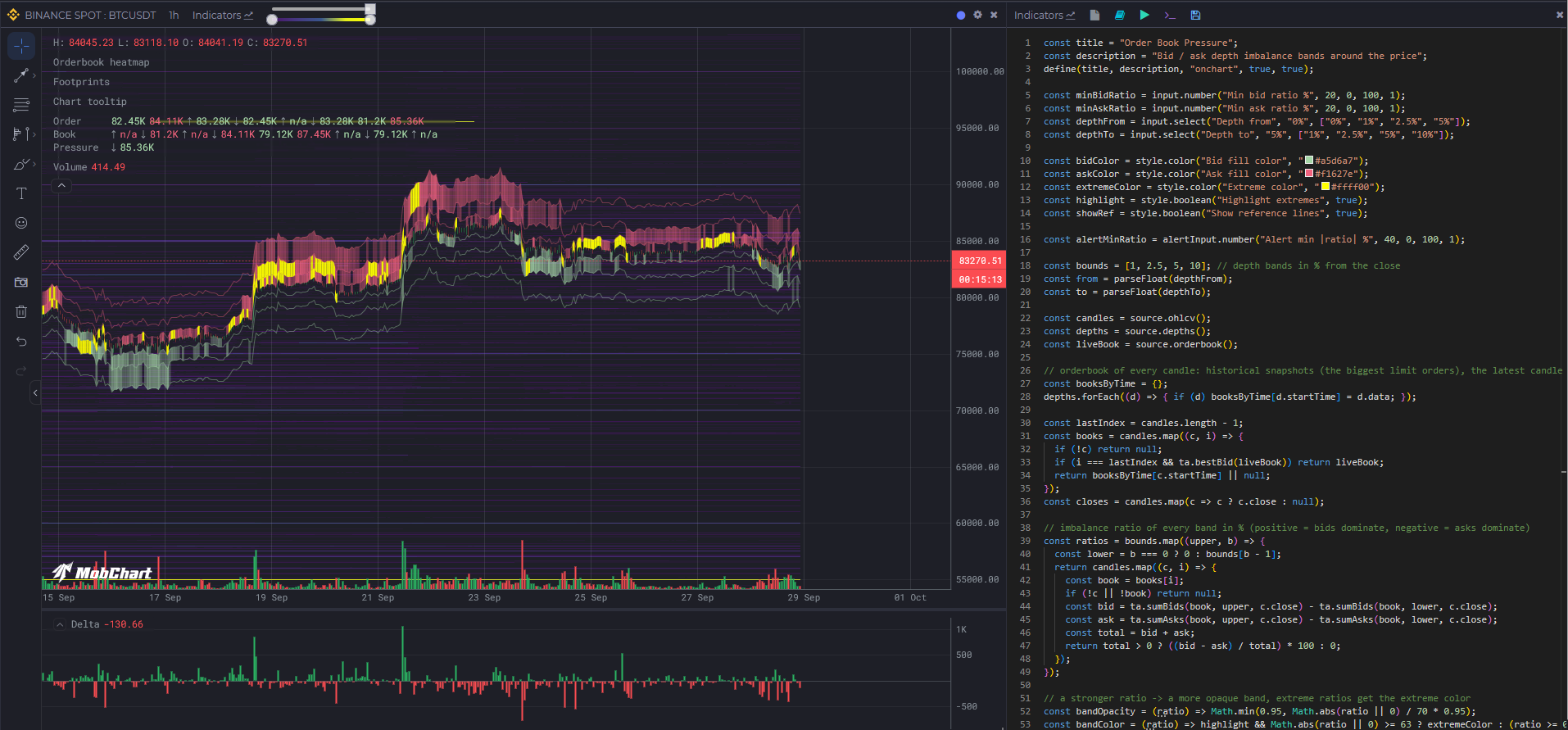
Order Book Pressure(价格周围的买卖盘深度失衡带,类似交易终端中的 "Order Book Pressure" 叠加层):
const title = "Order Book Pressure";const description = "Bid / ask depth imbalance bands around the price";define(title, description, "onchart", true, true);const minBidRatio = input.number("Min bid ratio %", 20, 0, 100, 1);const minAskRatio = input.number("Min ask ratio %", 20, 0, 100, 1);const depthFrom = input.select("Depth from", "0%", ["0%", "1%", "2.5%", "5%"]);const depthTo = input.select("Depth to", "5%", ["1%", "2.5%", "5%", "10%"]);const bidColor = style.color("Bid fill color", "#a5d6a7");const askColor = style.color("Ask fill color", "#f1627e");const extremeColor = style.color("Extreme color", "#ffff00");const highlight = style.boolean("Highlight extremes", true);const showRef = style.boolean("Show reference lines", true);const alertMinRatio = alertInput.number("Alert min |ratio| %", 40, 0, 100, 1);const bounds = [1, 2.5, 5, 10]; // 距收盘价的深度区间,%const from = parseFloat(depthFrom);const to = parseFloat(depthTo);const candles = source.ohlcv();const depths = source.depths();const liveBook = source.orderbook();// 每根K线的订单簿:depths()[i] 是 candles[i] 的快照(最大的限价单),最新K线使用实时订单簿const lastIndex = candles.length - 1;const books = candles.map((c, i) => {if (!c) return null;if (i === lastIndex && ta.bestBid(liveBook)) return liveBook;return depths[i]?.data || null;});const closes = candles.map(c => c ? c.close : null);// 每个区间的失衡比率,%(正值 = 买盘占优,负值 = 卖盘占优)const ratios = bounds.map((upper, b) => {const lower = b === 0 ? 0 : bounds[b - 1];return candles.map((c, i) => {const book = books[i];if (!c || !book) return null;const bid = ta.sumBids(book, upper, c.close) - ta.sumBids(book, lower, c.close);const ask = ta.sumAsks(book, upper, c.close) - ta.sumAsks(book, lower, c.close);const total = bid + ask;return total > 0 ? ((bid - ask) / total) * 100 : 0;});});// 比率越强 -> 带越不透明,极端比率使用极端颜色const bandOpacity = (ratio) => Math.min(0.95, Math.abs(ratio || 0) / 70 * 0.95);const bandColor = (ratio) => highlight && Math.abs(ratio || 0) >= 63 ? extremeColor : (ratio >= 0 ? bidColor : askColor);bounds.forEach((upper, b) => {const lower = b === 0 ? 0 : bounds[b - 1];if (from > lower || upper > to) return; // 该区间不在所选深度范围内const bidUpper = closes.map(c => c != null ? c * (1 - lower / 100) : null);const bidLower = closes.map(c => c != null ? c * (1 - upper / 100) : null);const askLower = closes.map(c => c != null ? c * (1 + lower / 100) : null);const askUpper = closes.map(c => c != null ? c * (1 + upper / 100) : null);if (showRef) {plot.lineSeries(`Bid ${upper}%`, bidLower, bidColor, 0.4);plot.lineSeries(`Ask ${upper}%`, askUpper, askColor, 0.4);}// 买盘压力:仅在买盘占优超过最小比率的K线上填充该带plot.bandSeries(`Bid pressure ${lower}-${upper}%`,bidUpper.map((v, i) => ratios[b][i] >= minBidRatio ? v : null),bidLower,(upper, lower, i) => bandColor(ratios[b][i]),(upper, lower, i) => bandOpacity(ratios[b][i]));// 卖盘压力plot.bandSeries(`Ask pressure ${lower}-${upper}%`,askUpper.map((v, i) => ratios[b][i] <= -minAskRatio ? v : null),askLower,(upper, lower, i) => bandColor(ratios[b][i]),(upper, lower, i) => bandOpacity(ratios[b][i]));// 最新K线上的提醒const latestRatio = ratios[b][lastIndex];if (latestRatio != null && Math.abs(latestRatio) >= alertMinRatio) {alert.fire(`Pressure ${lower}-${upper}%`, `ratio ${latestRatio.toFixed(1)}%`, candles[lastIndex].startTime);}});