사용자 지표 API
AI로 지표 생성하기
전체 API는 언어 모델용 단일 텍스트 파일로도 제공됩니다: AI-scripting.txt. 이 파일을 ChatGPT, Claude, Gemini 또는 다른 LLM에 첨부하고 원하는 지표를 설명하면 됩니다.
프롬프트 예시:
Read the attached [AI-scripting.txt] https://mobchart.com/docs/public/AI-scripting.txt file and use it as the only reference for the MobChart scripting API.Create a custom indicator that plots a 20-period EMA and a 50-period EMA on the chart. Color the candles green when EMA20 is above EMA50 and red otherwise.Use only the documented API. Do not invent functions. Return the complete indicator code.
샌드박스와 제한
지표 개발
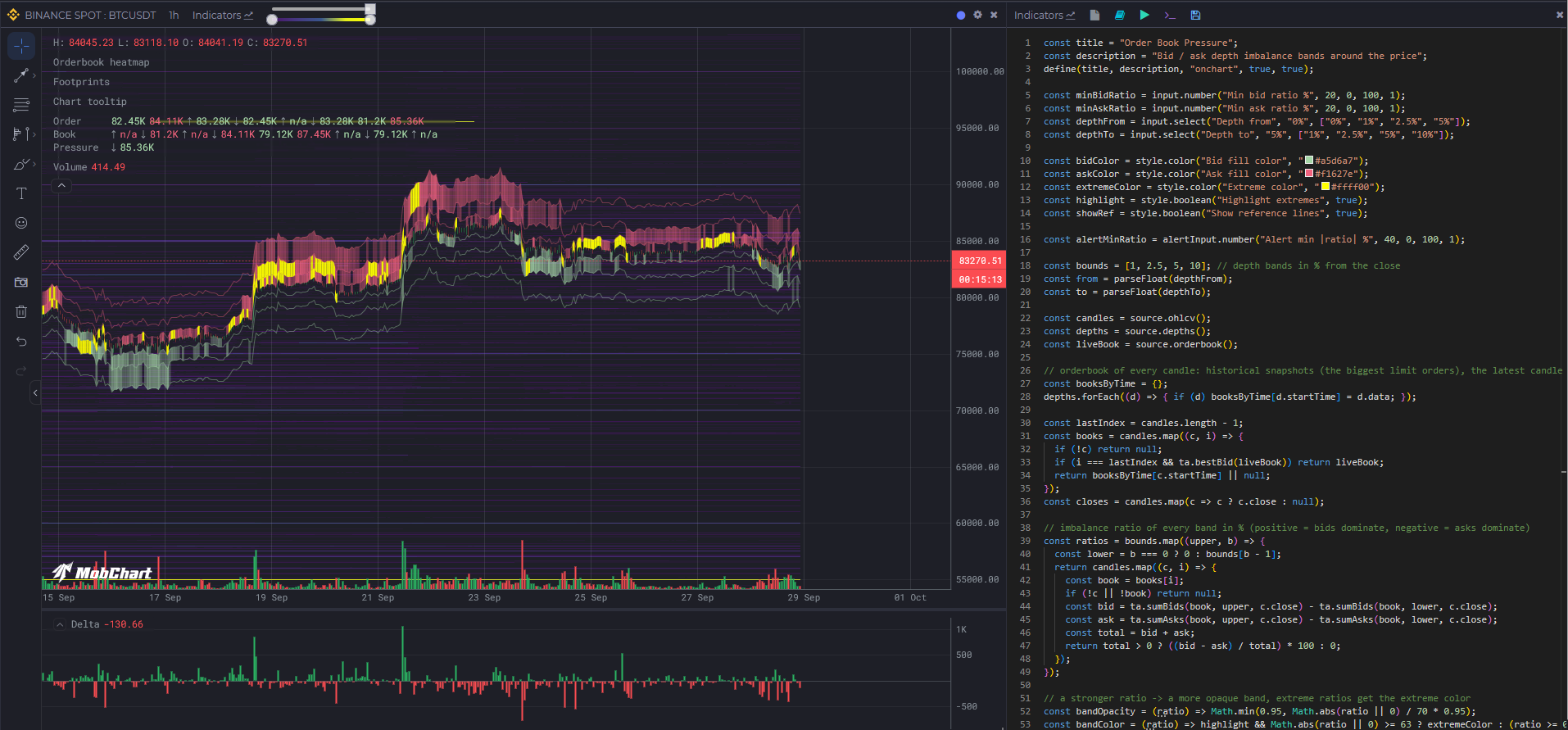
지표 개발은 별도의 위젯에서 진행되며, 이 위젯은 지표를 활성화할 차트 옆에 배치할 수 있습니다.
지표 만들기
define(title, description, type, isPublic, isPublicCode, options)
시스템에 지표를 등록합니다.
| 매개변수 | 타입 | 설명 |
|---|---|---|
title | string | 지표 이름 |
description | string | 짧은 설명 |
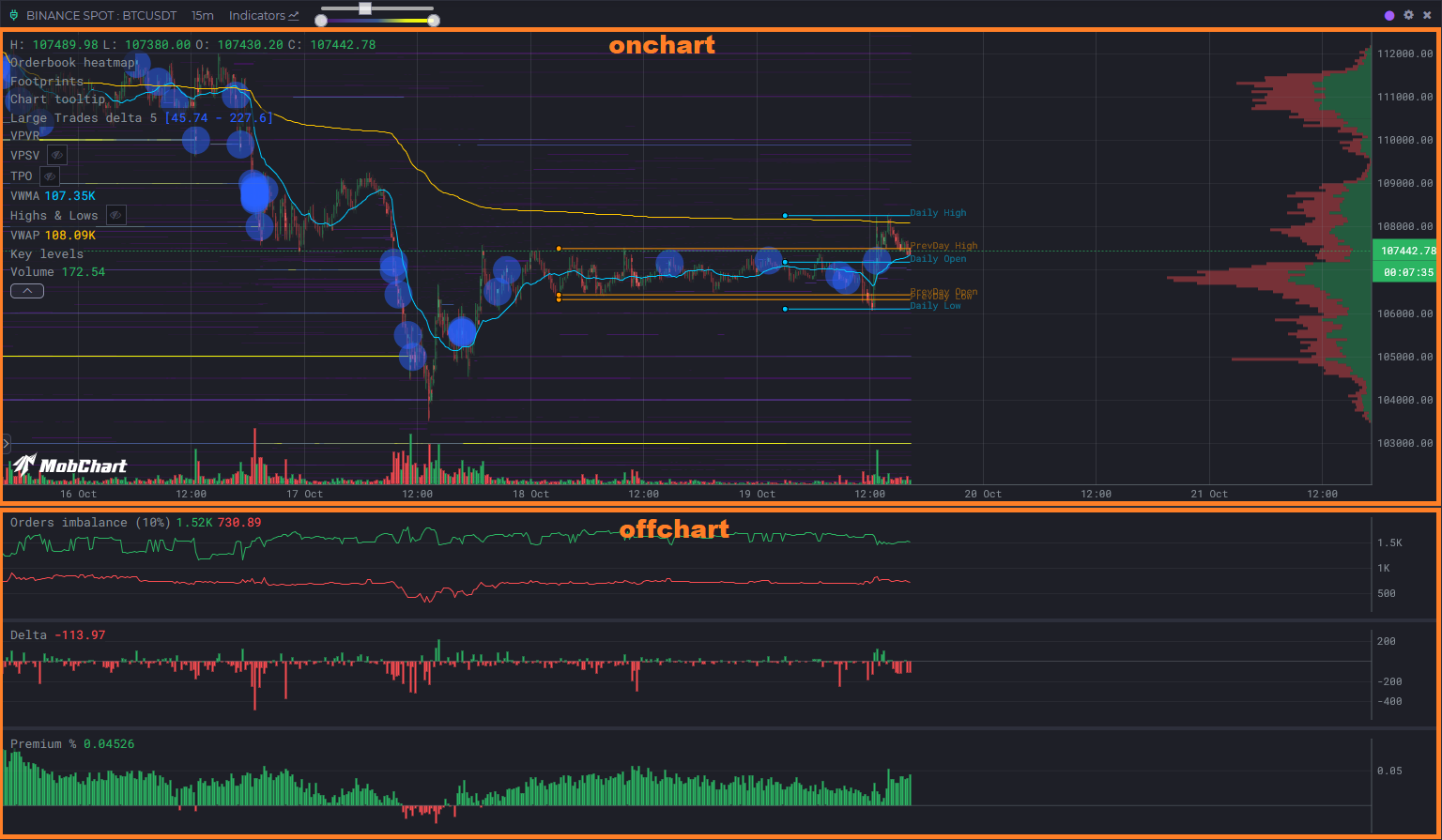
type | 'onchart' | 'offchart' | 지표 배치(차트 위 또는 별도 패널) |
isPublic | true | false | 지표 공개 여부 |
isPublicCode | true | false | 소스 코드 공개 여부 |
options | object (선택) | { fullRange, warmup }, 아래 참고 |
예시:
define("My Indicator", "Shows EMA line", "onchart", true, false);
계산 범위. 기본적으로 스크립트는 차트에서 계산이 필요한 부분만 계산합니다. 즉, 뒤로 스크롤하여 로드된 바 또는 새로고침 시 최신 바와 함께, 계산에는 필요하지만 반환되지는 않는 그 이전의 warmup 바(기본값 500)만큼의 히스토리를 계산합니다. 지표에 더 많거나 적은 히스토리가 필요하면 warmup을 선언하세요. 예를 들어 EMA(200)에는 { warmup: 200 }을 사용합니다. 값이나 도형이 보이는 전체 범위에 의존하는 스크립트(첫 번째 보이는 캔들부터의 VWAP, 누적 델타, 화면 내 최댓값의 라벨, 차트 전체에 그려지는 레벨)는 반드시 { fullRange: true }를 선언해야 하며, 그렇지 않으면 히스토리를 더 로드한 후 결과가 잘못됩니다. 이 모드는 스크립트를 저장할 때마다 define()에서 읽힙니다. fullRange 없이 저장된 스크립트는 부분적으로 계산되므로, 기존의 누적 스크립트를 편집할 때 이 플래그를 추가하세요. 부분 스크립트는 나뉘어서 로드되기도 합니다. 긴 히스토리에서 스크립트를 켜면 차트는 먼저 최신 500개 캔들(warmup이 더 크면 warmup개 캔들)을 요청하고, 더 오래된 부분은 한 번에 하나의 요청씩 이어서 로드되므로 보이는 부분이 즉시 나타납니다. fullRange가 있는 스크립트는 항상 전체 범위에 대해 단일 요청으로 계산됩니다.
define("Window max", "Label at the highest visible high", "onchart", true, true, { fullRange: true });
onchart와 offchart의 지표 배치:
입력 매개변수
input 및 style 클래스를 사용하면 사용자가 설정할 수 있는 설정을 만들 수 있습니다(PineScript의 input()과 유사).
| 메서드 | 설명 |
|---|---|
number(title, defaultValue, min, max, step) | 숫자 입력 |
range(title, defaultValue, min, max, step) | 범위 입력 |
select(title, defaultValue, values) | 드롭다운 선택 |
color(title, defaultValue) | 색상 선택기 |
boolean(title, defaultValue) | 불리언 입력 |
주요 매개변수용 예시(input):
const length = input.number("Period", 14, 1, 100, 1);const type = input.select("Type", 'sma', ['sma', 'ema']);const color = input.color("Line Color", "#FF0000");
또는 시각적 매개변수용(style):
const length = style.number("Size", 14, 1, 100, 1);const color = style.select("Background Color", '#FF0000', ["#FF0000", "#AA0000", "#BB0000"]);const color = style.color("Background Color", "#FF0000");
데이터 소스
source 클래스는 서버에서 시장 데이터를 가져옵니다. 캔들 기반 메서드는 동일한 매개변수를 받으며, 두 가지 실시간 스냅샷은 다릅니다. orderbook()은 거래소와 티커를, levels()는 거래소와 설정 객체를 받습니다.
| 매개변수 | 설명 |
|---|---|
exchange, ticker, timeframe | 기본값은 지표가 열린 차트입니다. 다른 시장의 데이터를 가져오려면 다른 값을 전달하세요. |
lookback | 현재 날짜로부터의 히스토리 바 개수, 최대 5000. |
ohlcv(exchange, ticker, timeframe, lookback?)
캔들 데이터.
[{"open": 115886.17,"high": 115911.96,"low": 115764.27,"close": 115815.16,"volume": 228.41528,"startTime": 1757699100000},{...},...]
depths(exchange, ticker, timeframe, lookback?)
캔들당 하나씩의 과거 오더북 스냅샷입니다. 가장 큰 지정가 주문만 저장됩니다(히트맵의 기반 데이터).
[{"data": {"asks": {"109425": 5.467,"109495": 3.564,...},"bids": {"33000": 3.746,"35000": 16.49,...}},"startTime": 1757699100000},{...},...]
clusters(exchange, ticker, timeframe, lookback?)
클러스터(풋프린트) 데이터: 캔들의 모든 가격 레벨별 매수 및 매도 거래량입니다.
[{"data": {"totalBuy": 16053385,"totalSell": 20490989,"0.8654": { "buy": 286845, "sell": 336689 },"0.8653": { "buy": 271848, "sell": 259167 },"0.8652": { "buy": 318814, "sell": 373497 },...},"startTime": 1757699100000},{...},...]
liquidations(exchange, ticker, timeframe, lookback?)
캔들의 모든 가격 레벨별 청산 거래량입니다(선물 시장만 해당). 형식은 clusters()와 같습니다.
[{"data": {"totalBuy": 16053385,"totalSell": 20490989,"0.8654": { "buy": 286845, "sell": 336689 },"0.8653": { "buy": 271848, "sell": 259167 },"0.8652": { "buy": 318814, "sell": 373497 },...},"startTime": 1757699100000},{...},...]
moreData(exchange, ticker, timeframe, lookback?)
캔들별 파생상품 데이터: 펀딩비, 미결제약정 캔들, 롱/숏 비율입니다(선물 시장만 해당).
[{"data": {"FR": 0.00003777, // 펀딩비"OI": { // 미결제약정 캔들"open": 85645.708,"close": 83496.225,"high": 85801.04,"low": 83397.918},"LS": { "l": 0.5426, "s": 0.4574 }, // 롱/숏 비율"taLS": { "l": 0.552, "s": 0.448 }, // 탑 트레이더 계정 비율"tpLS": { "l": 0.5996, "s": 0.4004 } // 탑 트레이더 포지션 비율},"startTime": 1757699100000},{...},...]
orderbook(exchange, ticker)
실시간 오더북 스냅샷: 캔들에 묶이지 않은 현재 전체 오더북입니다.
{"asks": {"109425": 5.467,"109495": 3.564,...},"bids": {"109400": 1.2,"109390": 0.8,...}}
레벨은 정렬되어 있지 않으므로, 오더북을 다룰 때는 ta 오더북 헬퍼(ta.bestBid, ta.sumBids, ...)를 사용하세요.
캔들의 과거 오더북은 depths()에서 가져옵니다. depths()[i].data는 형식이 같지만, 그곳에는 가장 큰 지정가 주문만 저장됩니다.
예시:
const candles = source.ohlcv(); // exchange, ticker, timeframe 매개변수의 기본값은 현재 차트입니다.const closes = candles.map(c => c.close);
levels(exchange, settings?)
유동성 스크리너의 레벨: 거래소의 대형 대기 지정가 주문을 스크리너 페이지와 동일한 설정으로 필터링한 것입니다. 캔들에 묶이지 않은 실시간 데이터입니다. 플랜이 없으면 근접도는 1%, 지속 시간은 60분, 결과는 200개 레벨로 제한되며, 플랜이 있으면 최대 2000개 레벨까지 가능합니다. 가장 큰 주문이 먼저 옵니다. 데이터 소스 요청 1회로 계산됩니다.
{"BTCUSDT": {"asks": {"109500": {"price": 109500,"quantity": 42.5, // 기초 자산 기준 수량"quantityUSDT": 4653750, // 견적 통화 기준 수량"distance": 0.62, // 현재 가격으로부터의 거리, 퍼센트"duration": 184, // 주문이 유지된 시간(분)"touches": 2,"currentTouches": 1,"filledPercent": 12.4,"strength": 95.5, // 퍼센트, 스크리너 참고"diversity": 11,"isContinuous": true,"date": "2026-10-10T06:12:03.000Z"},...},"bids": { ... },"volume1hTotal": 183000000},...}
설정 (모두 선택 사항):
| 설정 | 기본값 | 설명 |
|---|---|---|
tickers | 모든 티커 | 거래소의 이 티커들만 |
exclude | [] | 건너뛸 티커 |
type | "all" | "all", "bids" 또는 "asks" |
nearness | 5 | 현재 가격으로부터의 최대 거리, 퍼센트 |
size | 100000 | 견적 통화 기준 최소 주문 크기 |
lifespan | 0 | 주문이 유지된 최소 시간(분) |
touches, currentTouches | 0 | 레벨 / 현재 주문의 최소 터치 수 |
filled | 0 | 주문의 최소 체결 비율, 퍼센트 |
strength, diversity | 0 | 스크리너와 같은 최소 강도(퍼센트) 및 다양성 |
continuousOnly | false | 사라졌다가 다시 나타난 주문은 건너뜀 |
volume1h | 0 | 견적 통화 기준 티커의 최소 1시간 거래량 |
spotAndFutures | false | 현물과 선물 시장 모두에 존재하는 티커만 |
limit | 500 | 최대 레벨 수, 큰 것부터(최대 2000) |
예시:
// 차트 시장의 가격 주변 대형 주문을 수평선으로 표시하고, 크기와 지속 시간으로 라벨을 붙입니다const candles = await source.ohlcv();const lastDate = candles.at(-1).startTime;const levels = await source.levels(currentExchange, { tickers: [currentTicker], nearness: 3, size: 300000, lifespan: 30 });const own = levels[currentTicker] || { asks: {}, bids: {} };for (const [type, color] of [["asks", "#ef5350"], ["bids", "#26a69a"]]) {for (const [price, level] of Object.entries(own[type])) {plot.horizontalLine(`${type} ${price}`, +price, color, 0.8, Math.min(4, 1 + level.quantityUSDT / 1e6));plot.text(`${type} ${price} label`, `${(level.quantityUSDT / 1e6).toFixed(2)}M · ${level.duration}m`, lastDate, +price, 10, color);}}
HTTP 요청
http 클래스는 외부 HTTP API로 요청을 보내고 응답을 반환하므로, 지표는 source에서 제공되지 않는 데이터도 사용할 수 있습니다: 자체 서버, 공개 REST API, 온체인 지표 제공자 등.
source.*와 마찬가지로 호출은 동기 함수처럼 작성되며, await가 필요하지 않습니다.
| 메서드 | 설명 |
|---|---|
get(url, options?) | GET 요청 |
post(url, body?, options?) | POST 요청. 객체나 배열인 body는 JSON(Content-Type: application/json)으로, 문자열은 그대로 전송됩니다 |
options는 { headers: { name: value } }이며, 최대 10개의 사용자 지정 헤더(예: Authorization 또는 x-api-key)를 지정할 수 있습니다.
두 메서드 모두 동일한 응답 객체를 반환하며 예외를 던지지 않습니다:
{ok: true, // 상태 코드 200–299status: 200, // HTTP 상태 코드, 요청이 전송되지 않았으면 0headers: { "content-type": "application/json", ... },data: { ... }, // JSON으로 파싱된 응답 본문, 본문이 JSON이 아니면 nulltext: "...", // 원본 응답 본문error: null // 요청 실패 사유: "timeout", "url not allowed", "too many requests", ...}
가능한 error 값: invalid url, url not allowed, invalid headers, invalid body, body too large, response too large, timeout, too many requests, rate limit, busy, proxy unavailable, network error.
예시 (GET):
define("Fear & Greed", "Crypto Fear & Greed index", "offchart", true, true);const res = http.get("https://api.alternative.me/fng/?limit=30");if (!res.ok) logger.log("request failed:", res.status, res.error);// res.data = { data: [{ value: "71", timestamp: "1757635200" }, ...] }const byDay = {};(res.data?.data || []).forEach((row) => { byDay[Number(row.timestamp) * 1000] = Number(row.value); });const candles = source.ohlcv();const values = candles.map((c) => c ? byDay[c.startTime - (c.startTime % 86400000)] ?? null : null);plot.lineSeries("Fear & Greed", values, "#00C8FF");
예시 (POST):
const candles = source.ohlcv();const last = candles.at(-1);const res = http.post("https://example.com/api/signals",{ exchange: currentExchange, ticker: currentTicker, close: last.close },{ headers: { "x-api-key": "YOUR_KEY" } } // 비공개 코드에서만);logger.log("signal sent:", res.ok, res.status, res.data);
전역 변수
| 변수 | 설명 | 예시 |
|---|---|---|
currentExchange | 차트의 현재 거래소 | binance, binanceFutures, coinbase, ... |
currentTicker | 차트의 현재 티커(형식은 거래소에 따라 다름) | BTCUSDT, ADA-USD, BTC/USDC, ... |
currentTimeframe | 차트의 현재 타임프레임 | 1m, 5m, 15m, ... |
예시:
const candles = source.ohlcv(currentExchange, currentTicker, currentTimeframe);const closes = candles.map(c => c.close);
로깅
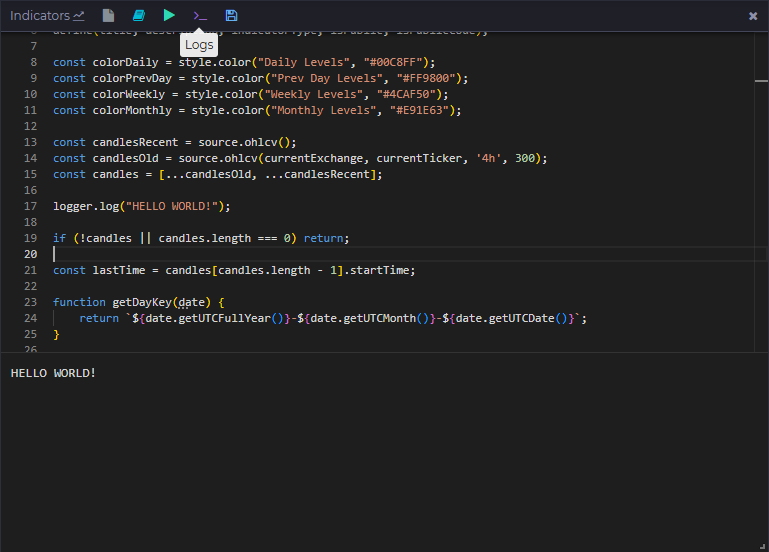
logger 클래스는 정보 출력과 디버깅에 사용됩니다.
| 메서드 | 설명 |
|---|---|
log(...args) | 로그에 항목을 추가합니다(길이와 개수 제한 있음) |
예시:
const candles = source.ohlcv();logger.log("First candle:", candles?.[0]);
시각화
plot 클래스는 그래픽 요소와 데이터 시리즈를 그리는 역할을 합니다.
기하 도형
| 메서드 | 설명 |
|---|---|
box(title, date1, price1, date2, price2, fill, opacity, stroke, strokeOpacity, strokeWidth) | 사각형 |
square(title, date1, price1, size, fill, opacity, stroke, strokeOpacity, strokeWidth) | 정사각형 |
diamond(title, date1, price1, size, fill, opacity, stroke, strokeOpacity, strokeWidth) | 마름모 |
triangle(title, date1, price1, size, fill, opacity, stroke, strokeOpacity, strokeWidth) | 삼각형 |
circle(title, date1, price1, radius = 10, fill, opacity, stroke, strokeOpacity, strokeWidth) | 원 |
text(title, value, date1, price1, fontSize, fill, opacity) | 차트 위 텍스트 |
table(title, rows, options) | 차트 모서리에 고정된 테이블, 테이블 참고 |
straightLine(title, date1, price1, date2, price2, stroke, strokeOpacity, strokeWidth, strokeDasharray) | 직선 |
horizontalLine(title, price1, stroke, strokeOpacity, strokeWidth, strokeDasharray) | 차트 전체를 가로지르는 수평선 |
verticalLine(title, date1, stroke, strokeOpacity, strokeWidth, strokeDasharray) | 차트 전체를 가로지르는 수직선 |
| 매개변수 | 데이터 타입 | 설명 |
|---|---|---|
title | string | 요소 이름(차트에서의 고유 식별자) |
date1 | number (타임스탬프, ms) | 시작 타임스탬프 |
price1 | number | 시작 가격(Y축 좌표) |
date2 | number (타임스탬프, ms) | 종료 타임스탬프(선과 사각형용) |
price2 | number | 종료 가격(선과 사각형용) |
size | number | 도형 크기(픽셀) |
radius | number | 원의 반지름(기본값 10) |
fill | string (hex, 예: "#FF0000") | 도형의 채우기 색상 |
opacity | number (0–1) | 채우기 불투명도 |
stroke | string (hex, 예: "#000000") | 테두리 색상 |
strokeOpacity | number (0–1) | 테두리 불투명도 |
strokeWidth | number | 테두리 두께(픽셀) |
strokeDasharray | array (예: [5,5]) | 점선 스타일 |
fontSize | number | 텍스트 크기(픽셀) |
value | string | 텍스트 값(text 메서드용) |
예시:
plot.text("Text object", "Hello world!", 1757699100000, 115000, 10, "#00C8FF", 0.5);plot.straightLine(`${namePrefix} Open`, level.timeStart, level.open, level.timeEnd, level.open, color);plot.circle(`${namePrefix} High`, level.timeStart, level.high, 3, color);
차트에는 최대 3000개의 도형만 표시할 수 있습니다.
데이터 시리즈
| 메서드 | 설명 |
|---|---|
lineSeries(title, values, stroke, strokeOpacity, strokeWidth, strokeDasharray) | 라인 차트 |
barSeries(title, values, fill, opacity) | 막대 차트 |
candleSeries(title, openValues, closeValues, highValues, lowValues, fill, opacity) | 캔들 |
areaSeries(title, values, fill, opacity, stroke, strokeOpacity, strokeWidth, base) | 선과 base(기본값: 차트 하단) 사이를 채운 영역 |
bandSeries(title, upperValues, lowerValues, fill, opacity, stroke, strokeOpacity, strokeWidth, step) | 두 시리즈 사이를 채운 밴드, 각 캔들은 자체 색상과 불투명도를 가집니다 |
profile(title, values, options) | 보이는 캔들에 대한 볼륨 프로파일 형태의 히스토그램, 프로필 참고 |
histogram(title, rows, options) | 완성된 가격 맵을 프로필로 그림, 히스토그램 참고 |
| 매개변수 | 데이터 타입 | 설명 |
|---|---|---|
values, upperValues, lowerValues | (number \| null)[] | 캔들당 하나의 값, null이면 해당 캔들을 숨깁니다 |
fill, stroke | string (hex) 또는 function | 색상, 또는 캔들의 색상을 반환하는 함수: lineSeries, barSeries, candleSeries, areaSeries는 (value, i), bandSeries는 (upper, lower, i) |
opacity | number (0–1) 또는 function | 채우기 불투명도, areaSeries / bandSeries에서는 함수 (value, i) / (upper, lower, i) |
base | number | null | areaSeries의 기준 레벨, null = 차트 하단 |
step | boolean | bandSeries 스타일: true = 캔들당 하나의 열(기본값), false = 연속된 다각형 |
예시:
plot.lineSeries("EMA", ta.ema(closes, 20), "#00C8FF");// 각 캔들이 자체 색상을 가집니다: 종가가 EMA보다 위면 녹색, 아래면 빨간색plot.lineSeries("Close", closes, (v, i) => v > ema[i] ? colorBuy : colorSell);plot.barSeries("Premium %", premiumPercents, ((d) => d > 0 ? color1 : color2), 1);plot.candleSeries("Candles",opens, closes, highs, lows,(v, i) => {return opens?.[i] > closes?.[i] ? colorBuy : colorSell});plot.areaSeries("Volume", volumes, "#00C8FF", 0.3);// 캔들별로 색칠된 영역, 큰 캔들일수록 더 불투명하게plot.areaSeries("Delta", deltas, (v, i) => v >= 0 ? colorBuy : colorSell, (v, i) => Math.min(1, Math.abs(v) / maxDelta));// 종가와 그보다 1% 아래 사이의 압력 밴드, 캔들의 불균형 비율에 따라 색상과 음영을 적용plot.bandSeries("Bid pressure",closes,closes.map(c => c * 0.99),(upper, lower, i) => ratios[i] > 0 ? bidColor : askColor,(upper, lower, i) => Math.abs(ratios[i]) / 100);
차트에는 최대 20개의 데이터 시리즈만 표시할 수 있습니다.
프로필
plot.profile(title, values, options?)는 내장 볼륨 프로파일처럼 가격별 히스토그램을 그립니다. values[i]는 ohlcv()의 캔들 i에 대한 가격 맵입니다: { price: value } 또는 { price: { buy, sell } }(clusters() 또는 liquidations() 레코드의 data를 그대로 전달할 수 있습니다), 행이 없는 캔들은 null. 차트에 보이는 캔들의 행은 차트 자체에서 가격 단위별로 합산되므로, 프로필은 새로 실행하지 않아도 이동, 확대/축소, 추가 로드를 따라갑니다. 단일 값은 한 가지 색상으로 그려지고(음수 값은 fill2로), 쌍은 막대를 매수와 매도 부분으로 나누며 델타 모드를 사용할 수 있습니다. profile()은 알림 핸들을 반환하지 않습니다.
| 옵션 | 기본값 | 설명 |
|---|---|---|
step | 차트 틱 크기 | 가격 단위의 행 높이, 가격은 이 값 단위로 내림됩니다 |
orient | "right" | 막대가 자라나는 가장자리, "right" 또는 "left" |
width | 30 | 가장 넓은 행의 너비, 차트 너비 대비 퍼센트 |
fill | "#26a69a" | 값 또는 매수 부분의 색상 |
fill2 | "#ef5350" | 매도 부분의 색상 |
opacity | 0.6 | 막대 불투명도 |
delta | false | 합계 대신 buy - sell을 그림, 쌍에만 해당 |
poc | true | 가장 큰 값을 가진 행에 선 표시 |
valueArea | 70 | POC 주변에서 완전 불투명도로 그려지는 전체 대비 퍼센트, 비활성화하려면 false |
valueAreaOpacity | 0.3 | 밸류 에어리어 밖의 행 불투명도 |
labels | true | 공간이 있을 때 막대에 행 합계 표시 |
제한: 실행당 프로필 3개, 캔들당 300행, 프로필당 200000행. 제한을 넘는 행은 버려지며 실행 로그에 메모가 남습니다.
예시:
// 차트의 볼륨 프로파일, 내장 도구와 같은 그림const rows = await source.clusters();plot.profile("Volume", rows.map((r) => r?.data ?? null), { step: 5 });// 대량 거래만, 델타 색상, 왼쪽 가장자리const minSize = input.number("Min trade size", 50, 0, 100000, 1);const big = rows.map((r) => {if (!r?.data) return null;const out = {};for (const [price, c] of Object.entries(r.data)) {if (price === "totalBuy" || price === "totalSell") continue;if (c.buy + c.sell >= minSize) out[price] = { buy: c.buy, sell: c.sell };}return out;});plot.profile("Large trades", big, { step: 5, delta: true, orient: "left" });
히스토그램
plot.histogram(title, rows, options?)는 이미 만들어 둔 히스토그램을 그립니다: 차트 전체에 대한 하나의 가격 맵이며, 캔들에서 합산되는 것은 없습니다. 행이 캔들에 속하고 그림이 보이는 범위를 따라가야 할 때는 profile()을, 행이 최종 결과일 때는 histogram()을 사용하세요: 오더북 스냅샷, 스크립트가 계산한 레벨, 다른 시장의 데이터 등.
rows는 profile()의 캔들 항목과 같은 형식을 가집니다: { price: value }, { price: { buy, sell } } 또는 [price, buy, sell] 행의 목록. 단일 값은 한 가지 색상으로 그려지고(음수 값은 fill2로), 쌍은 막대를 매수와 매도 부분으로 나누며 델타 모드를 사용할 수 있습니다. 옵션은 profile()과 같으며, 위의 표를 참고하세요.
히스토그램은 실행의 마지막 캔들 날짜를 가지며, 차트는 제목별로 가장 최신 히스토그램을 유지하므로 오래된 캔들에 대한 부분 실행(히스토리 로딩)이 현재 히스토그램을 대체하지 않습니다. 스크립트가 새로고침될 때마다 다시 그려지므로, 오더북 히스토그램은 실시간 오더북을 따라갑니다. histogram()은 알림 핸들을 반환하지 않습니다.
제한: 실행당 히스토그램 3개, 5000행. 제한을 넘는 행은 버려지며 실행 로그에 메모가 남습니다.
예시, 오더북:
// 실시간 오더북을 오른쪽 가장자리에 프로필로 표시: 매수 호가는 매수 색상, 매도 호가는 매도 색상const book = await source.orderbook();const rows = {};for (const [price, qty] of Object.entries(book.bids)) rows[price] = { buy: qty };for (const [price, qty] of Object.entries(book.asks)) rows[price] = { sell: qty };plot.histogram("Order book", rows, { step: 5, width: 25, valueArea: false, poc: false });
예시, 직접 만든 레벨:
// 직접 만든 히스토그램: 최근 100개 캔들의 클러스터 거래량, 최근 캔들일수록 가중치가 큼const rows = await source.clusters();const weighted = {};rows.slice(-100).forEach((r, i, arr) => {if (!r?.data) return;const weight = (i + 1) / arr.length;for (const [price, c] of Object.entries(r.data)) {if (price === "totalBuy" || price === "totalSell") continue;const cell = weighted[price] || (weighted[price] = { buy: 0, sell: 0 });cell.buy += (c.buy || 0) * weight;cell.sell += (c.sell || 0) * weight;}});plot.histogram("Weighted volume", weighted, { step: 5, orient: "left", delta: true });
테이블
plot.table(title, rows, options?)는 차트 패널의 모서리에 고정된 작은 표를 그립니다: 멀티 타임프레임 요약, 로드된 범위의 통계, 신호 대시보드 등. rows는 행의 배열이고, 행은 셀의 배열이며, 셀은 문자열, 숫자 또는 { text, color, bg, align, bold }입니다. 같은 모서리의 테이블은 순서대로 쌓입니다. 테이블은 실행의 마지막 캔들 날짜를 가지며, 차트는 제목별로 가장 최신 테이블을 유지하므로 오래된 캔들에 대한 부분 실행(히스토리 로딩)이 현재 테이블을 대체하지 않습니다. 너비가 500 px보다 좁은 차트에는 테이블이 그려지지 않습니다. 테이블은 마우스로 드래그할 수 있습니다: 위치는 워크스페이스와 함께 저장되며, 스크립트가 position 옵션을 변경하면 초기화됩니다. table()은 알림 핸들을 반환하지 않습니다.
| 옵션 | 기본값 | 설명 |
|---|---|---|
position | "top-right" | 패널의 모서리: "top-right", "top-left", "bottom-right", "bottom-left" |
header | false | 첫 번째 행을 음영 띠 위에 굵게 표시 |
fontSize | 11 | 텍스트 크기(px), 8부터 16까지 |
color, bg, border | 테마에 따름 | 기본 텍스트, 패널, 격자 색상; 셀에서 color와 bg를 재정의할 수 있습니다 |
opacity | 0.85 | 패널 불투명도 |
align | "left" | 기본 셀 정렬, "left", "center" 또는 "right" |
제한: 실행당 테이블 3개, 50행, 10열, 셀당 100자. 더 긴 텍스트는 말줄임표로 잘리며, 한 열은 차트 너비의 최대 30%를 차지합니다.
예시:
const candles = await source.ohlcv();const closes = candles.map((c) => c.close);const rsi = ta.rsi(closes, 14);const last = rsi.at(-1);const change = (closes.at(-1) / closes.at(-25) - 1) * 100;plot.table("Stats", [["Metric", "Value"],["RSI 14", { text: last.toFixed(1), color: last > 70 ? "#ef5350" : last < 30 ? "#26a69a" : undefined }],["Change 24 bars", { text: change.toFixed(2) + "%", align: "right" }],["Volume", candles.slice(-24).reduce((s, c) => s + c.volume, 0).toFixed(0)],], { position: "top-right", header: true });
기술적 분석
ta 클래스는 PineScript v5의 ta.* 함수를 구현합니다. Pine은 바 단위로 동작하지만, 여기서는 모든 함수가 전체 시리즈(배열, 캔들당 하나의 값, 오래된 것부터)를 받아 바로 플로팅할 수 있는 같은 길이의 시리즈를 반환합니다. 기간이 아직 채워지지 않은 동안 값은 null이며, null 입력은 Pine의 na처럼 전파됩니다. high, low, close 또는 volume을 암묵적으로 읽는 Pine 함수는 해당 배열을 인수로 받습니다.
여러 시리즈를 반환하는 함수(bb, kc, macd, stoch, dmi, supertrend)는 이름이 붙은 속성도 가진 배열을 반환합니다: const [middle, upper, lower] = ta.bb(closes, 20, 2) 또는 ta.bb(closes, 20, 2).upper.
헬퍼 함수
| 메서드 | 설명 |
|---|---|
highest(values, length) / lowest(values, length) | length개 바 동안의 최고값 / 최저값 |
highestbars(values, length) / lowestbars(values, length) | 최고 / 최저 바까지의 오프셋(0 또는 음수) |
max(values) / min(values) | 각 바까지의 역대 최고 / 최저값 |
range(values, length) | highest - lowest |
change(values, length = 1) | values[i] - values[i - length] |
mom(values, length) | 모멘텀 |
roc(values, length) | 변화율, % |
cum(values) | 누적 합계 |
rising(values, length) / falling(values, length) | 값이 이전 length개의 값 각각보다 위 / 아래인지 여부 |
variance(values, length, biased = true) | 분산 |
stdev(values, length, biased = true) | 표준편차 |
dev(values, length) | 평균 절대 편차 |
median(values, length) | 중앙값 |
mode(values, length) | 최빈값(동률이면 가장 작은 값) |
percentile_linear_interpolation(values, length, percentage) | 백분위수, 가장 가까운 두 순위 사이의 선형 보간 |
percentile_nearest_rank(values, length, percentage) | 백분위수, 최근접 순위 방식 |
percentrank(values, length) | 이전 length개 값 중 현재 값 이하인 값의 비율(%) |
correlation(series1, series2, length) | 상관 계수 |
crossover(series1, series2) | 상향 교차(어느 인수든 숫자가 될 수 있음: ta.crossover(rsi, 70)) |
crossunder(series1, series2) | 하향 교차 |
cross(series1, series2) | 모든 교차 |
barssince(condition) | condition(불리언 배열)이 마지막으로 참이었던 이후의 바 수 |
valuewhen(condition, values, occurrence = 0) | condition이 occurrence번 전에 참이었을 때의 values 값 |
pivothigh(values, leftbars, rightbars) / pivotlow(...) | 확인 바에서의 피벗 값, 피벗 자체는 rightbars개 바 이전에 있습니다 |
이동평균
| 메서드 | 설명 |
|---|---|
sma(values, length) | 단순 이동평균 |
ema(values, length) | 지수 이동평균 |
rma(values, length) | 와일더 이동평균(RSI / ATR에서 사용) |
wma(values, length) | 가중 이동평균 |
hma(values, length) | 헐 이동평균 |
alma(values, length, offset = 0.85, sigma = 6, floor = false) | 아르노 르구 이동평균(ALMA) |
swma(values) | 4개 바에 대한 대칭 가중 이동평균 |
vwma(values, volumes, length) | 거래량 가중 이동평균 |
linreg(values, length, offset = 0) | 선형 회귀 곡선 |
오실레이터
| 메서드 | 설명 |
|---|---|
rsi(values, length) | 상대강도지수(RSI) |
cmo(values, length) | 샹드 모멘텀 오실레이터 |
cog(values, length) | 무게 중심(Center of Gravity) |
mfi(values, volumes, length) | 자금 흐름 지수(values는 보통 hlc3) |
tsi(values, shortLength, longLength) | 진정 강도 지수(TSI), -1..1 |
wpr(highs, lows, closes, length) | 윌리엄스 %R |
stoch(highs, lows, closes, period = 14, smoothK = 3, smoothD = 3) | 스토캐스틱 [k, d], smoothK = 1이면 원시 값 |
cci(values, length) / cci(highs, lows, closes, length) | 상품 채널 지수(두 번째 형식은 대표 가격 기준) |
macd(values, fast = 12, slow = 26, signalPeriod = 9) | MACD [macd, signal, histogram] |
밴드와 채널
| 메서드 | 설명 |
|---|---|
bb(values, length = 20, mult = 2) / bollinger(...) | 볼린저 밴드 [middle, upper, lower] |
bbw(values, length, mult) | 볼린저 밴드 폭 (upper - lower) / middle |
kc(values, highs, lows, closes, length = 20, mult = 2, useTrueRange = true) | 켈트너 채널 [middle, upper, lower] |
kcw(values, highs, lows, closes, length, mult, useTrueRange) | 켈트너 채널 폭 (upper - lower) / middle |
추세와 변동성
| 메서드 | 설명 |
|---|---|
tr(highs, lows, closes, handleNa = false) | 실제 범위(True Range, handleNa = true이면 첫 번째 바에서 high - low) |
atr(highs, lows, closes, period = 14) | 평균 실제 범위(ATR) |
dmi(highs, lows, closes, diLength = 14, adxSmoothing = 14) | 방향성 지표 [plus, minus, adx] |
adx(highs, lows, closes, period = 14) | 평균 방향성 지수(ADX) |
sar(highs, lows, closes, start = 0.02, inc = 0.02, max = 0.2) | 파라볼릭 SAR |
supertrend(highs, lows, closes, factor = 3, atrPeriod = 10) | 슈퍼트렌드 [supertrend, direction], direction -1 = 상승 추세, 1 = 하락 추세 |
거래량
| 메서드 | 설명 |
|---|---|
vwap(values, volumes, anchor?) / vwap(highs, lows, closes, volumes, anchor?) | 누적 VWAP(두 번째 형식은 대표 가격 기준), anchor(불리언 배열)가 참인 바에서 다시 시작 |
obv(closes, volumes) | 온밸런스 볼륨(OBV) |
accdist(highs, lows, closes, volumes) | 매집 / 분산(A/D) |
iii(highs, lows, closes, volumes) | 일중 강도 지수(Intraday Intensity Index) |
pvt(closes, volumes) | 가격-거래량 추세(PVT) |
nvi(closes, volumes) / pvi(closes, volumes) | 음 / 양 거래량 지수 |
wad(highs, lows, closes) | 윌리엄스 매집 / 분산 |
wvad(opens, highs, lows, closes, volumes) | 윌리엄스 가변 매집 / 분산 |
오더북 헬퍼
orderbook은 source.orderbook() 또는 source.depths()[i].data입니다: {asks: {price: quantity}, bids: {price: quantity}}.
| 메서드 | 설명 |
|---|---|
orderbookSide(orderbook, side) | 한쪽('bids' / 'asks')을 최우선 가격부터 정렬된 [[price, quantity], ...]로 반환 |
bestBid(orderbook) / bestAsk(orderbook) | 최우선 매수 / 매도 호가(빈 오더북이면 null) |
sumBids(orderbook, percent, price, inQuote) | price(기본값: 최우선 매수 호가)와 price * (1 - percent / 100) 사이의 누적 매수 수량, inQuote = true이면 price * quantity를 합산 |
sumAsks(orderbook, percent, price, inQuote) | price(기본값: 최우선 매도 호가)와 price * (1 + percent / 100) 사이의 누적 매도 수량 |
예시:
const candles = source.ohlcv();const closes = candles.map(c => c.close);const rsiValues = ta.rsi(closes, 14);plot.lineSeries("RSI", rsiValues, "#00C8FF");
알림
사용자는 차트의 지표 설정에 있는 알림 탭에서 여러분의 지표에 대한 알림을 만들 수 있습니다. 알림은 서버 측에서 정기적으로 확인되며, 알림 메시지는 Telegram 및/또는 사용자가 지정한 웹훅 URL로 전송됩니다.
알림 설정 — alertInput
alertInput 클래스는 알림 설정을 선언합니다. input과 똑같이 동작하지만, 필드는 알림 탭에 표시되며 각 사용자가 자신의 알림에 대해 고유한 값을 설정합니다.
alertInput 선언이 없는 스크립트는 알림에 사용할 수 없습니다.
| 메서드 | 설명 |
|---|---|
number(title, defaultValue, min, max, step) | 숫자 입력 |
range(title, defaultValue, min, max, step) | 범위 입력 |
select(title, defaultValue, values) | 드롭다운 선택 |
color(title, defaultValue) | 색상 선택기 |
boolean(title, defaultValue) | 불리언 입력 |
예시:
const alertVolumeThreshold = alertInput.number("Volume threshold", 1000, 0, 10000000, 1);
알림 발생 — alert.fire
| 메서드 | 설명 |
|---|---|
fire(title, message, date) | 알림을 발생시킵니다 |
- 세 매개변수 모두 필수입니다.
title,message또는date가 누락된 호출은 건너뜁니다(로그에 경고가 기록됩니다). - 알림 제목은 고정하고, 고유한 제목을 생성하지 마세요. 각 제목은 실행당 한 번만 발생합니다(실행당 최대 20개 제목).
date는 신호가 속한 캔들의startTime입니다. 같은 제목은 더 새로운 캔들에 대해 발생할 때만 다시 알립니다. 사용자가 알림을 만든 시점보다 오래된 캔들의 신호는 무시됩니다(스팸 방지).
예시:
if (candle.volume > alertVolumeThreshold) {alert.fire("High volume", `vol ${candle.volume}`, candle.startTime);}
도형 알림 — plot.<shape>(...).alert(...)
모든 기하 도형(box, square, diamond, triangle, circle, straightLine, horizontalLine, verticalLine, text)은 .alert() 메서드가 있는 핸들을 반환합니다.
알림은 도형의 date1로 자동 발생하므로 추가 코드 없이 스팸 방지 로직이 동작합니다. 캔들별 신호에는 이 방법을 권장합니다.
두 가지 형식:
// 간단한 형식: 새 날짜에 도형이 그려질 때마다 발생plot.box(...).alert("High volume", `vol ${candle.volume}`);// 콜백: 건너뛰려면 아무것도 반환하지 않고, 발생시키려면 [title, message]를 반환plot.box(...).alert((shape) => {if (candle.volume > alertVolumeThreshold)alert.fire("High volume", `vol ${candle.volume}`, candle.startTime);});
콜백은 도형 데이터(date1, price1, date2, price2, ...)를 받습니다.
시리즈 알림 — plot.<series>(...).alert(...)
데이터 시리즈(lineSeries, barSeries, candleSeries, areaSeries, bandSeries)도 .alert() 핸들을 반환합니다.
콜백은 최신 데이터 포인트와 최신 캔들 날짜를 받으며, 알림은 그 날짜로 발생합니다.
lineSeries/barSeries/areaSeries— 콜백은 마지막 값(숫자)을 받습니다candleSeries— 콜백은 마지막 캔들{open, close, high, low}를 받습니다bandSeries— 콜백은 마지막{upper, lower}를 받습니다
plot.lineSeries("RSI", rsiValues, color).alert((rsi, date) => {if (rsi > alertRsiThreshold) alert.fire("RSI high", `RSI ${rsi.toFixed(1)}`, latestCandle.startTime);});
참으로 유지되는 조건은 새 캔들마다 한 번 알립니다. 일회성 신호에는 교차 방식의 조건(ta.crossover)을 사용하세요.
전체 예시
const title = "Volume alerts";const description = "Shows boxes on high-volume candles";define(title, description, "onchart", true, true);const color = style.color("Color", "#00C8FF");const volumeThreshold = input.number("Volume threshold", 1000, 0, 10000000, 1);const alertVolumeThreshold = alertInput.number("Alert volume threshold", 5000, 0, 10000000, 1);const alertCloseThreshold = alertInput.number("Alert close threshold", 100000, 0, 10000000, 1);const candles = source.ohlcv();const latestCandle = candles.at(-1);const closes = candles.map(c => c.close);// 시리즈 알림: 최신 종가를 확인합니다plot.lineSeries("Closes", closes, color).alert((close, date) => {if (close > alertCloseThreshold) alert.fire("Close above threshold", `close ${close}`, latestCandle.startTime);});for (let i = 0; i < candles.length; i++) {const candle = candles[i];if (candle.volume > volumeThreshold) {const right = i < candles.length - 1 ? candles[i + 1].startTime : candle.startTime + 60000;// 도형 알림: 사용자의 알림 임계값과 비교합니다plot.box(`Volume ${i}`, candle.startTime, candle.high, right, candle.low, "#00C8FF", 0.3).alert(() => {if (candle.volume > alertVolumeThreshold)alert.fire("High volume", `vol ${candle.volume}`, candle.startTime);});}}
지표 예시
const title = "Your first indicator";const description = "Shows closes lines on the chart";const indicatorType = "onchart";define(title, description, indicatorType, true, true);const color = input.color("Line Color", "#00C8FF");const candles = source.ohlcv();const closes = candles.map(c => c.close);plot.lineSeries("Closes", closes, color);
define("Example Indicator", "Demonstrates basic plotting", "onchart", true, true);const color = input.color("Line Color", "#00FF99");const candles = source.ohlcv();const closes = candles.map(c => c.close);const ema20 = ta.ema(closes, 20);plot.lineSeries("EMA 20", ema20, color);
const title = "Colored Volume Bars";const description = "Volumes colored based on candle direction.";const indicatorType = "onchart";const isPublic = true;const isPublicCode = true;define(title, description, indicatorType, isPublic, isPublicCode);// OHLC 캔들 가져오기const candles = source.ohlcv();const colorUp = style.color("Color 1", "#2BB462"); // 상승 가격용 녹색 계열const colorDown = style.color("Color 2", "#FB4C51"); // 하락 가격용 빨간색 계열const volumes = candles.map(candle => candle.volume);plot.barSeries("Volume", volumes, (value, index) => {const currentCandle = candles[index];return currentCandle.close >= currentCandle.open ? colorUp : colorDown;});
define('Coinbase Premium Index', 'Coinbase Premium Index', 'offchart', true, false);const color1 = style.color("Color 1", "#2BB462");const color2 = style.color("Color 2", "#FB4C51");// OHLC 캔들 가져오기const cbCandles = source.ohlcv('coinbase', 'BTC-USD');const binanceCandles = source.ohlcv('binance', 'BTCUSDT');// 종가 추출const cbCloses = cbCandles.map(c => c.close);const binanceCloses = binanceCandles.map(c => c.close);// --- Coinbase 프리미엄 지수 계산 ---const premiumPercent = cbCloses.map((cb, i) => {const b = binanceCloses[i];return ((cb - b) / b) * 100;});// 프리미엄 지수 플로팅plot.barSeries("Premium %", premiumPercent, ((d) => d > 0 ? color1 : color2)) // 퍼센트 차이
const title = "Candles";const description = "Simple candles draw";const indicatorType = "offchart";const isPublic = true;const isPublicCode = true;define(title, description, indicatorType, isPublic, isPublicCode);const colorBuy = style.color("Buy Color", "#2BB462");const colorSell = style.color("Sell Color", "#7a3d3f");const candles = source.ohlcv();const closes = candles.map(c => c.close);const opens = candles.map(c => c.open);const highs = candles.map(c => c.high);const lows = candles.map(c => c.low);plot.candleSeries("Candles",opens, closes, highs, lows,(v, i) => {return opens?.[i] > closes?.[i] ? colorBuy : colorSell});
Order Book Pressure(가격 주변의 매수 / 매도 호가 깊이 불균형 밴드로, 트레이딩 터미널의 "Order Book Pressure" 오버레이와 유사):
const title = "Order Book Pressure";const description = "Bid / ask depth imbalance bands around the price";define(title, description, "onchart", true, true);const minBidRatio = input.number("Min bid ratio %", 20, 0, 100, 1);const minAskRatio = input.number("Min ask ratio %", 20, 0, 100, 1);const depthFrom = input.select("Depth from", "0%", ["0%", "1%", "2.5%", "5%"]);const depthTo = input.select("Depth to", "5%", ["1%", "2.5%", "5%", "10%"]);const bidColor = style.color("Bid fill color", "#a5d6a7");const askColor = style.color("Ask fill color", "#f1627e");const extremeColor = style.color("Extreme color", "#ffff00");const highlight = style.boolean("Highlight extremes", true);const showRef = style.boolean("Show reference lines", true);const alertMinRatio = alertInput.number("Alert min |ratio| %", 40, 0, 100, 1);const bounds = [1, 2.5, 5, 10]; // 종가로부터의 깊이 밴드(%)const from = parseFloat(depthFrom);const to = parseFloat(depthTo);const candles = source.ohlcv();const depths = source.depths();const liveBook = source.orderbook();// 각 캔들의 오더북: depths()[i]는 candles[i]의 스냅샷(가장 큰 지정가 주문), 최신 캔들은 실시간 오더북을 사용const lastIndex = candles.length - 1;const books = candles.map((c, i) => {if (!c) return null;if (i === lastIndex && ta.bestBid(liveBook)) return liveBook;return depths[i]?.data || null;});const closes = candles.map(c => c ? c.close : null);// 각 밴드의 불균형 비율(%) (양수 = 매수 우세, 음수 = 매도 우세)const ratios = bounds.map((upper, b) => {const lower = b === 0 ? 0 : bounds[b - 1];return candles.map((c, i) => {const book = books[i];if (!c || !book) return null;const bid = ta.sumBids(book, upper, c.close) - ta.sumBids(book, lower, c.close);const ask = ta.sumAsks(book, upper, c.close) - ta.sumAsks(book, lower, c.close);const total = bid + ask;return total > 0 ? ((bid - ask) / total) * 100 : 0;});});// 비율이 강할수록 밴드가 더 불투명해지고, 극단적인 비율은 극단 색상을 사용const bandOpacity = (ratio) => Math.min(0.95, Math.abs(ratio || 0) / 70 * 0.95);const bandColor = (ratio) => highlight && Math.abs(ratio || 0) >= 63 ? extremeColor : (ratio >= 0 ? bidColor : askColor);bounds.forEach((upper, b) => {const lower = b === 0 ? 0 : bounds[b - 1];if (from > lower || upper > to) return; // 밴드가 선택한 깊이 범위를 벗어남const bidUpper = closes.map(c => c != null ? c * (1 - lower / 100) : null);const bidLower = closes.map(c => c != null ? c * (1 - upper / 100) : null);const askLower = closes.map(c => c != null ? c * (1 + lower / 100) : null);const askUpper = closes.map(c => c != null ? c * (1 + upper / 100) : null);if (showRef) {plot.lineSeries(`Bid ${upper}%`, bidLower, bidColor, 0.4);plot.lineSeries(`Ask ${upper}%`, askUpper, askColor, 0.4);}// 매수 압력: 매수가 최소 비율보다 더 우세한 캔들에서만 밴드를 채움plot.bandSeries(`Bid pressure ${lower}-${upper}%`,bidUpper.map((v, i) => ratios[b][i] >= minBidRatio ? v : null),bidLower,(upper, lower, i) => bandColor(ratios[b][i]),(upper, lower, i) => bandOpacity(ratios[b][i]));// 매도 압력plot.bandSeries(`Ask pressure ${lower}-${upper}%`,askUpper.map((v, i) => ratios[b][i] <= -minAskRatio ? v : null),askLower,(upper, lower, i) => bandColor(ratios[b][i]),(upper, lower, i) => bandOpacity(ratios[b][i]));// 최신 캔들에 대한 알림const latestRatio = ratios[b][lastIndex];if (latestRatio != null && Math.abs(latestRatio) >= alertMinRatio) {alert.fire(`Pressure ${lower}-${upper}%`, `ratio ${latestRatio.toFixed(1)}%`, candles[lastIndex].startTime);}});