カスタムインジケーターAPI
AIでインジケーターを生成する
API全体は、言語モデル向けの1つのテキストファイルとしても利用できます: AI-scripting.txt。ChatGPT、Claude、Gemini などのLLMに添付し、作りたいインジケーターを説明してください。
プロンプトの例:
Read the attached [AI-scripting.txt] https://mobchart.com/docs/public/AI-scripting.txt file and use it as the only reference for the MobChart scripting API.Create a custom indicator that plots a 20-period EMA and a 50-period EMA on the chart. Color the candles green when EMA20 is above EMA50 and red otherwise.Use only the documented API. Do not invent functions. Return the complete indicator code.
サンドボックスと制限
インジケーターの開発
インジケーターの開発は専用のウィジェットで行います。このウィジェットは、インジケーターを有効にするチャートの横に配置できます。
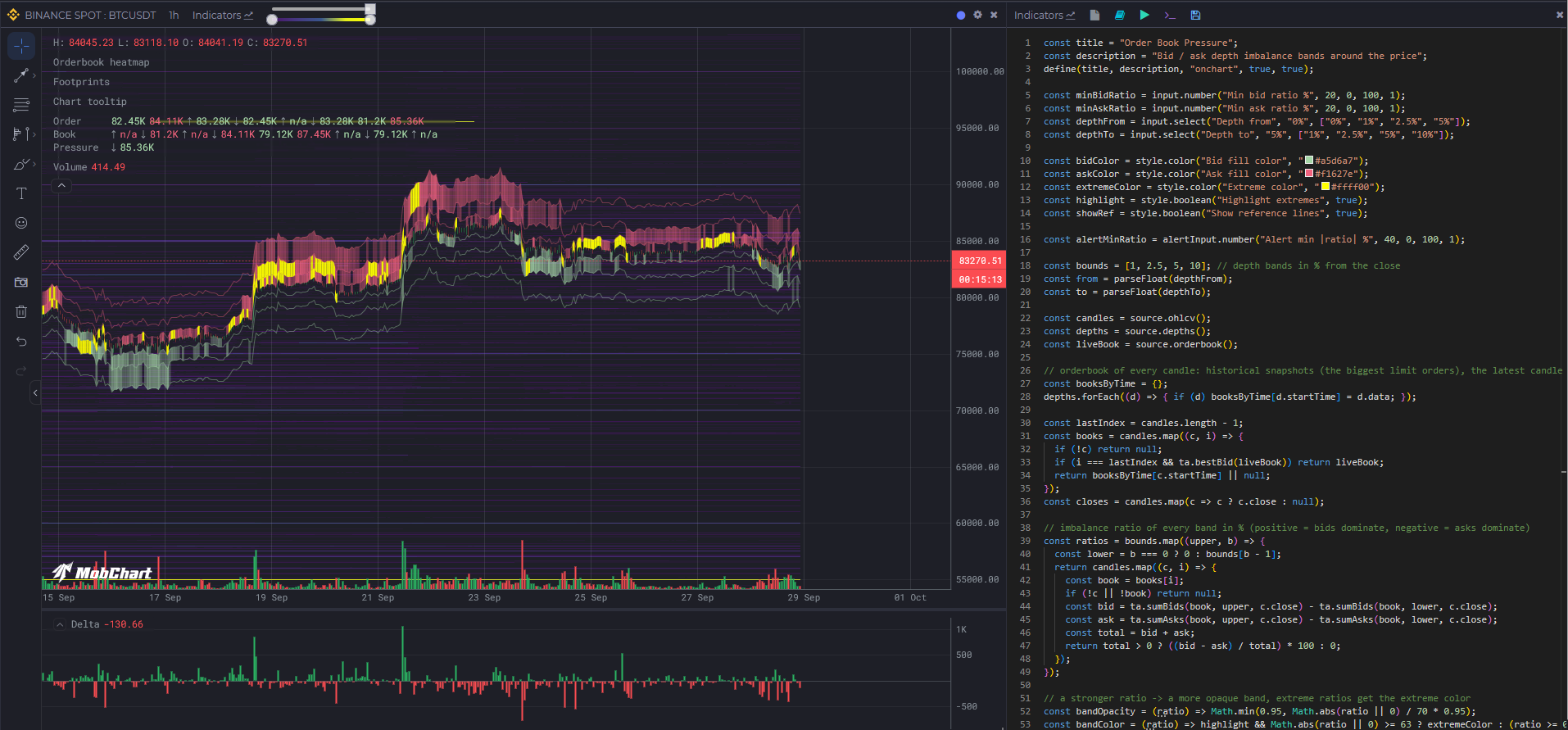
インジケーターの作成
define(title, description, type, isPublic, isPublicCode, options)
インジケーターをシステムに登録します。
| パラメーター | 型 | 説明 |
|---|---|---|
title | string | インジケーター名 |
description | string | 短い説明 |
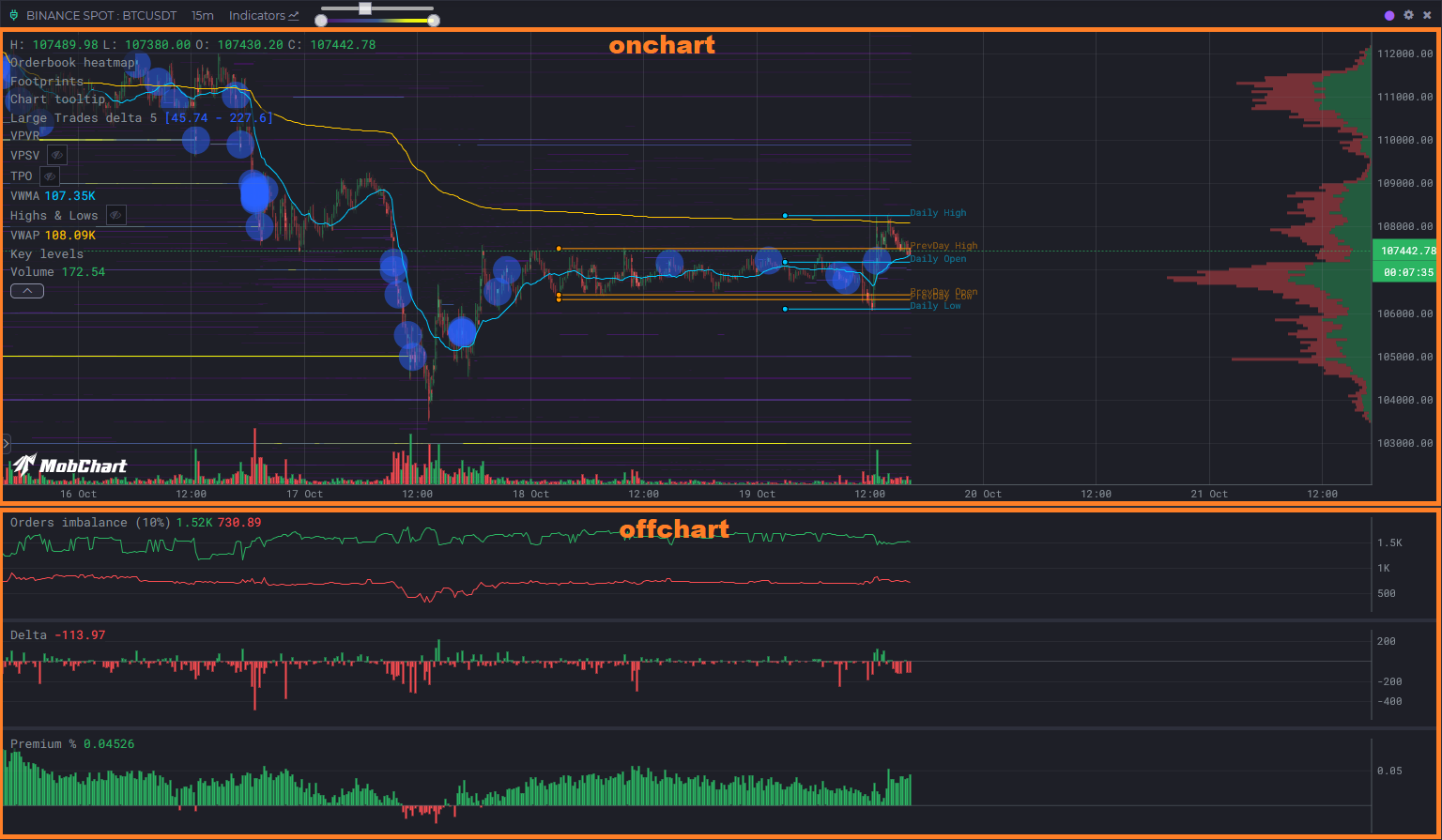
type | 'onchart' | 'offchart' | インジケーターの配置(チャート上、または別パネル) |
isPublic | true | false | インジケーターを公開するかどうか |
isPublicCode | true | false | ソースコードを公開するかどうか |
options | object(任意) | { fullRange, warmup }、下記参照 |
例:
define("My Indicator", "Shows EMA line", "onchart", true, false);
計算範囲。 デフォルトでは、スクリプトはチャートのうち計算が必要な部分だけを計算します。つまり、過去へスクロールして読み込まれたバー、または更新時の最新のバーに加えて、その前にある warmup 本の履歴バー(デフォルト500)です。これらの履歴バーは計算には必要ですが、結果としては返されません。インジケーターに必要な履歴がこれより多い、または少ない場合は warmup を宣言してください。例えば EMA(200) なら { warmup: 200 } です。値や図形が 表示範囲全体 に依存するスクリプト(最初の表示ローソク足からの VWAP、累積デルタ、表示範囲の最大値に置くラベル、チャート全体に引くレベルなど)は { fullRange: true } を宣言する必要があります。そうしないと、さらに履歴を読み込んだ後に結果が正しくなくなります。モードはスクリプトを保存するたびに define() から読み取られます。fullRange なしで保存されたスクリプトは部分的に計算されるため、既存の累積型スクリプトを編集するときはこのフラグを追加してください。部分計算のスクリプトは分割して読み込まれます。長い履歴の上でスクリプトを有効にすると、チャートはまず最新の500本のローソク足(warmup の方が多い場合は warmup 本)をリクエストし、古い部分は1リクエストずつ続けて読み込まれるため、表示部分はすぐに表示されます。fullRange のスクリプトは常に範囲全体を1回のリクエストで計算します。
define("Window max", "Label at the highest visible high", "onchart", true, true, { fullRange: true });
onchart と offchart のインジケーター配置:
入力パラメーター
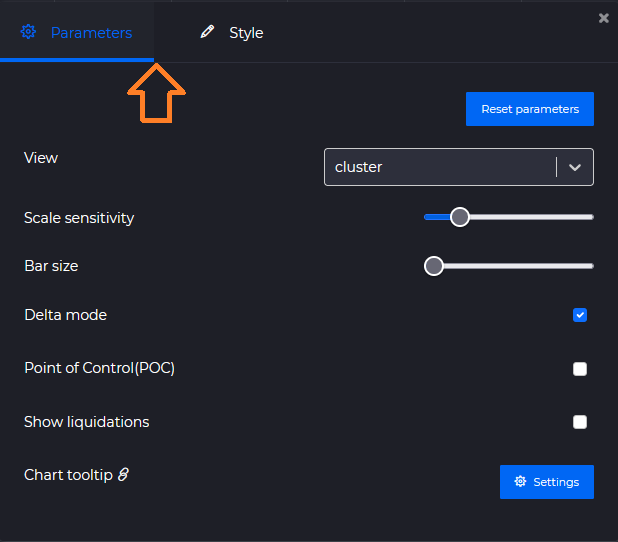
input クラスと style クラスを使うと、ユーザーが変更できる設定を作成できます(PineScript の input() に相当します)。
| メソッド | 説明 |
|---|---|
number(title, defaultValue, min, max, step) | 数値入力 |
range(title, defaultValue, min, max, step) | 範囲入力 |
select(title, defaultValue, values) | ドロップダウン選択 |
color(title, defaultValue) | カラーピッカー |
boolean(title, defaultValue) | 真偽値入力 |
主なパラメーター用の例(input):
const length = input.number("Period", 14, 1, 100, 1);const type = input.select("Type", 'sma', ['sma', 'ema']);const color = input.color("Line Color", "#FF0000");
または表示用パラメーターには(style):
const length = style.number("Size", 14, 1, 100, 1);const color = style.select("Background Color", '#FF0000', ["#FF0000", "#AA0000", "#BB0000"]);const color = style.color("Background Color", "#FF0000");
データソース
source クラスはサーバーから市場データを取得します。ローソク足ベースのメソッドは同じパラメーターを受け取ります。2つのライブスナップショットは異なり、orderbook() は取引所とティッカーを、levels() は取引所と設定オブジェクトを受け取ります。
| パラメーター | 説明 |
|---|---|
exchange, ticker, timeframe | デフォルトはインジケーターを開いているチャートの値です。別の市場のデータを取得するには、別の値を渡します。 |
lookback | 現在の日付からの履歴バーの本数。5000以下 です。 |
ohlcv(exchange, ticker, timeframe, lookback?)
ローソク足データ。
[{"open": 115886.17,"high": 115911.96,"low": 115764.27,"close": 115815.16,"volume": 228.41528,"startTime": 1757699100000},{...},...]
depths(exchange, ticker, timeframe, lookback?)
ローソク足ごとに1つの、過去のオーダーブックのスナップショット。最大の指値注文だけが保存されています(ヒートマップの元になるデータです)。
[{"data": {"asks": {"109425": 5.467,"109495": 3.564,...},"bids": {"33000": 3.746,"35000": 16.49,...}},"startTime": 1757699100000},{...},...]
clusters(exchange, ticker, timeframe, lookback?)
クラスター(フットプリント)データ: ローソク足の各価格レベルにおける買いと売りの出来高。
[{"data": {"totalBuy": 16053385,"totalSell": 20490989,"0.8654": { "buy": 286845, "sell": 336689 },"0.8653": { "buy": 271848, "sell": 259167 },"0.8652": { "buy": 318814, "sell": 373497 },...},"startTime": 1757699100000},{...},...]
liquidations(exchange, ticker, timeframe, lookback?)
ローソク足の各価格レベルにおける清算出来高(先物市場のみ)。形式は clusters() と同じです。
[{"data": {"totalBuy": 16053385,"totalSell": 20490989,"0.8654": { "buy": 286845, "sell": 336689 },"0.8653": { "buy": 271848, "sell": 259167 },"0.8652": { "buy": 318814, "sell": 373497 },...},"startTime": 1757699100000},{...},...]
moreData(exchange, ticker, timeframe, lookback?)
ローソク足ごとのデリバティブデータ: 資金調達率、建玉 (OI) のローソク足、ロング/ショート比率(先物市場のみ)。
[{"data": {"FR": 0.00003777, // 資金調達率"OI": { // 建玉 (OI) のローソク足"open": 85645.708,"close": 83496.225,"high": 85801.04,"low": 83397.918},"LS": { "l": 0.5426, "s": 0.4574 }, // ロング/ショート比率"taLS": { "l": 0.552, "s": 0.448 }, // トップトレーダーのアカウント比率"tpLS": { "l": 0.5996, "s": 0.4004 } // トップトレーダーのポジション比率},"startTime": 1757699100000},{...},...]
orderbook(exchange, ticker)
ライブのオーダーブックのスナップショット: ローソク足に紐付かない、現在の完全な板です。
{"asks": {"109425": 5.467,"109495": 3.564,...},"bids": {"109400": 1.2,"109390": 0.8,...}}
レベルはソートされていません。板を扱うには ta のオーダーブックヘルパー(ta.bestBid、ta.sumBids など)を使用してください。
ローソク足ごとの過去の板は depths() から取得できます。depths()[i].data は同じ形式ですが、そこには最大の指値注文だけが保存されています。
例:
const candles = source.ohlcv(); // exchange、ticker、timeframe パラメーターのデフォルトは現在のチャートです。const closes = candles.map(c => c.close);
levels(exchange, settings?)
流動性スクリーナー のレベル: 取引所の大口の指値注文を、スクリーナーページと同じ設定でフィルタリングしたものです。ローソク足に紐付かないライブデータです。プランなしでは、近さは1%、存続時間は60分、結果は200レベルに制限されます。プランがあれば最大2000レベルまで取得できます。最大の注文が先頭に来ます。データソースリクエスト1回としてカウントされます。
{"BTCUSDT": {"asks": {"109500": {"price": 109500,"quantity": 42.5, // 基軸通貨でのサイズ"quantityUSDT": 4653750, // 決済通貨でのサイズ"distance": 0.62, // 現在価格からの距離、パーセント"duration": 184, // 注文が置かれている分数"touches": 2,"currentTouches": 1,"filledPercent": 12.4,"strength": 95.5, // パーセント、スクリーナーを参照"diversity": 11,"isContinuous": true,"date": "2026-10-10T06:12:03.000Z"},...},"bids": { ... },"volume1hTotal": 183000000},...}
設定(すべて任意):
| 設定 | デフォルト | 説明 |
|---|---|---|
tickers | すべてのティッカー | 取引所のこれらのティッカーのみ |
exclude | [] | スキップするティッカー |
type | "all" | "all"、"bids" または "asks" |
nearness | 5 | 現在価格からの最大距離、パーセント |
size | 100000 | 決済通貨での最小注文サイズ |
lifespan | 0 | 注文が置かれている最小の分数 |
touches, currentTouches | 0 | レベル / 現在の注文の最小タッチ数 |
filled | 0 | 注文の約定済み部分の最小値、パーセント |
strength, diversity | 0 | 最小の強さ(パーセント)と多様性、スクリーナーと同じ |
continuousOnly | false | 消えて再び現れた注文をスキップする |
volume1h | 0 | 決済通貨でのティッカーの最小1時間出来高 |
spotAndFutures | false | 現物市場と先物市場の両方に存在するティッカーのみ |
limit | 500 | レベルの最大数、大きい順(最大2000) |
例:
// チャートの市場の価格付近の大口注文を水平線で表示し、サイズと継続時間のラベルを付けるconst candles = await source.ohlcv();const lastDate = candles.at(-1).startTime;const levels = await source.levels(currentExchange, { tickers: [currentTicker], nearness: 3, size: 300000, lifespan: 30 });const own = levels[currentTicker] || { asks: {}, bids: {} };for (const [type, color] of [["asks", "#ef5350"], ["bids", "#26a69a"]]) {for (const [price, level] of Object.entries(own[type])) {plot.horizontalLine(`${type} ${price}`, +price, color, 0.8, Math.min(4, 1 + level.quantityUSDT / 1e6));plot.text(`${type} ${price} label`, `${(level.quantityUSDT / 1e6).toFixed(2)}M · ${level.duration}m`, lastDate, +price, 10, color);}}
HTTPリクエスト
http クラスは外部のHTTP APIにリクエストを送信してレスポンスを返します。これにより、インジケーターは source では取得できないデータ(自分のサーバー、公開REST API、オンチェーン指標プロバイダーなど)を利用できます。
source.* と同様に、呼び出しは同期関数として記述し、await は不要です。
| メソッド | 説明 |
|---|---|
get(url, options?) | GETリクエスト |
post(url, body?, options?) | POSTリクエスト。オブジェクトまたは配列の body はJSON(Content-Type: application/json)として送信され、文字列はそのまま送信されます |
options は { headers: { name: value } } です。カスタムヘッダーは 10個 まで指定できます(例えば Authorization や x-api-key)。
どちらのメソッドも同じレスポンスオブジェクトを返し、例外を投げることはありません:
{ok: true, // ステータス 200–299status: 200, // HTTPステータス、リクエストが送信されなかった場合は 0headers: { "content-type": "application/json", ... },data: { ... }, // JSONとして解析したレスポンス本文、本文がJSONでない場合は nulltext: "...", // 生のレスポンス本文error: null // リクエストが失敗した理由: "timeout", "url not allowed", "too many requests", ...}
error に入りうる値: invalid url、url not allowed、invalid headers、invalid body、body too large、response too large、timeout、too many requests、rate limit、busy、proxy unavailable、network error。
例(GET):
define("Fear & Greed", "Crypto Fear & Greed index", "offchart", true, true);const res = http.get("https://api.alternative.me/fng/?limit=30");if (!res.ok) logger.log("request failed:", res.status, res.error);// res.data = { data: [{ value: "71", timestamp: "1757635200" }, ...] }const byDay = {};(res.data?.data || []).forEach((row) => { byDay[Number(row.timestamp) * 1000] = Number(row.value); });const candles = source.ohlcv();const values = candles.map((c) => c ? byDay[c.startTime - (c.startTime % 86400000)] ?? null : null);plot.lineSeries("Fear & Greed", values, "#00C8FF");
例(POST):
const candles = source.ohlcv();const last = candles.at(-1);const res = http.post("https://example.com/api/signals",{ exchange: currentExchange, ticker: currentTicker, close: last.close },{ headers: { "x-api-key": "YOUR_KEY" } } // 非公開コードのみ);logger.log("signal sent:", res.ok, res.status, res.data);
グローバル変数
| 変数 | 説明 | 例 |
|---|---|---|
currentExchange | チャートの現在の取引所 | binance, binanceFutures, coinbase, ... |
currentTicker | チャートの現在のティッカー(形式は取引所によって異なります) | BTCUSDT, ADA-USD, BTC/USDC, ... |
currentTimeframe | チャートの現在の時間足 | 1m, 5m, 15m, ... |
例:
const candles = source.ohlcv(currentExchange, currentTicker, currentTimeframe);const closes = candles.map(c => c.close);
ログ出力
logger クラスは情報の出力とデバッグに使用します。
| メソッド | 説明 |
|---|---|
log(...args) | ログにエントリーを追加します(長さと件数に制限があります) |
例:
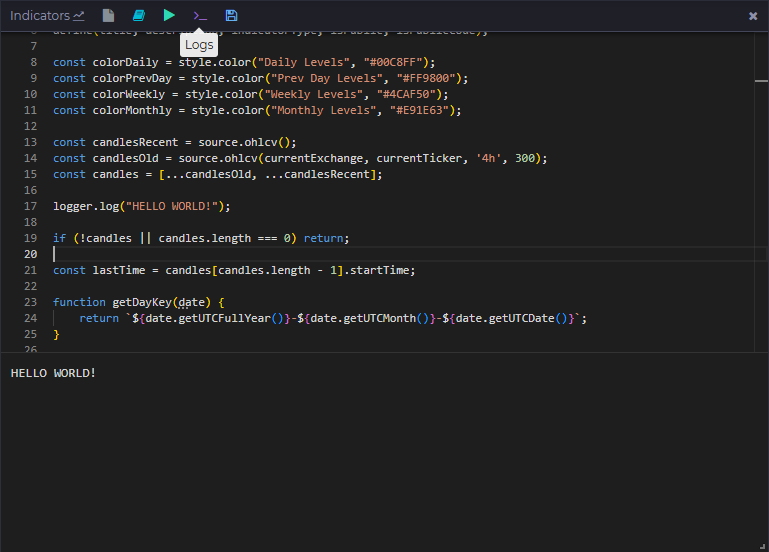
const candles = source.ohlcv();logger.log("First candle:", candles?.[0]);
可視化
plot クラスはグラフィック要素とデータ系列の描画を担当します。
図形
| メソッド | 説明 |
|---|---|
box(title, date1, price1, date2, price2, fill, opacity, stroke, strokeOpacity, strokeWidth) | 長方形 |
square(title, date1, price1, size, fill, opacity, stroke, strokeOpacity, strokeWidth) | 正方形 |
diamond(title, date1, price1, size, fill, opacity, stroke, strokeOpacity, strokeWidth) | ひし形 |
triangle(title, date1, price1, size, fill, opacity, stroke, strokeOpacity, strokeWidth) | 三角形 |
circle(title, date1, price1, radius = 10, fill, opacity, stroke, strokeOpacity, strokeWidth) | 円 |
text(title, value, date1, price1, fontSize, fill, opacity) | チャート上のテキスト |
table(title, rows, options) | チャートの隅に固定されるテーブル。テーブル を参照 |
straightLine(title, date1, price1, date2, price2, stroke, strokeOpacity, strokeWidth, strokeDasharray) | 直線 |
horizontalLine(title, price1, stroke, strokeOpacity, strokeWidth, strokeDasharray) | チャート全体を横切る水平線 |
verticalLine(title, date1, stroke, strokeOpacity, strokeWidth, strokeDasharray) | チャート全体を縦に貫く垂直線 |
| パラメーター | データ型 | 説明 |
|---|---|---|
title | string | 要素名(チャート上の一意な識別子) |
date1 | number(タイムスタンプ、ms) | 開始タイムスタンプ |
price1 | number | 開始価格(Y軸の座標) |
date2 | number(タイムスタンプ、ms) | 終了タイムスタンプ(線と長方形用) |
price2 | number | 終了価格(線と長方形用) |
size | number | 図形のサイズ(ピクセル) |
radius | number | 円の半径(デフォルト 10) |
fill | string(hex、例: "#FF0000") | 図形の塗りつぶし色 |
opacity | number(0–1) | 塗りつぶしの不透明度 |
stroke | string(hex、例: "#000000") | 線の色 |
strokeOpacity | number(0–1) | 線の不透明度 |
strokeWidth | number | 線の太さ(ピクセル) |
strokeDasharray | array(例: [5,5]) | 破線のスタイル |
fontSize | number | テキストのサイズ(ピクセル) |
value | string | テキストの値(text メソッド用) |
例:
plot.text("Text object", "Hello world!", 1757699100000, 115000, 10, "#00C8FF", 0.5);plot.straightLine(`${namePrefix} Open`, level.timeStart, level.open, level.timeEnd, level.open, color);plot.circle(`${namePrefix} High`, level.timeStart, level.high, 3, color);
チャートに表示できる図形は 3000 個までです。
データ系列
| メソッド | 説明 |
|---|---|
lineSeries(title, values, stroke, strokeOpacity, strokeWidth, strokeDasharray) | 折れ線グラフ |
barSeries(title, values, fill, opacity) | 棒グラフ |
candleSeries(title, openValues, closeValues, highValues, lowValues, fill, opacity) | ローソク足 |
areaSeries(title, values, fill, opacity, stroke, strokeOpacity, strokeWidth, base) | 線と base(デフォルト: チャートの下端)の間を塗りつぶしたエリア |
bandSeries(title, upperValues, lowerValues, fill, opacity, stroke, strokeOpacity, strokeWidth, step) | 2つの系列の間を塗りつぶしたバンド。ローソク足ごとに独自の色と不透明度を持ちます |
profile(title, values, options) | 表示中のローソク足の出来高プロファイル風ヒストグラム。プロファイル を参照 |
histogram(title, rows, options) | 完成した価格マップをプロファイルとして描画。ヒストグラム を参照 |
| パラメーター | データ型 | 説明 |
|---|---|---|
values, upperValues, lowerValues | (number \| null)[] | ローソク足1本につき1つの値。null はそのローソク足を非表示にします |
fill, stroke | string(hex)または function | 色、またはローソク足の色を返す関数: lineSeries、barSeries、candleSeries、areaSeries では (value, i)、bandSeries では (upper, lower, i) |
opacity | number(0–1)または function | 塗りつぶしの不透明度。areaSeries / bandSeries では関数 (value, i) / (upper, lower, i) も可 |
base | number | null | areaSeries の基準レベル。null = チャートの下端 |
step | boolean | bandSeries のスタイル: true = ローソク足ごとに1列(デフォルト)、false = 連続した多角形 |
例:
plot.lineSeries("EMA", ta.ema(closes, 20), "#00C8FF");// ローソク足ごとに独自の色: 終値がEMAより上なら緑、下なら赤plot.lineSeries("Close", closes, (v, i) => v > ema[i] ? colorBuy : colorSell);plot.barSeries("Premium %", premiumPercents, ((d) => d > 0 ? color1 : color2), 1);plot.candleSeries("Candles",opens, closes, highs, lows,(v, i) => {return opens?.[i] > closes?.[i] ? colorBuy : colorSell});plot.areaSeries("Volume", volumes, "#00C8FF", 0.3);// ローソク足ごとに色付けしたエリア。大きいローソク足ほど不透明plot.areaSeries("Delta", deltas, (v, i) => v >= 0 ? colorBuy : colorSell, (v, i) => Math.min(1, Math.abs(v) / maxDelta));// 終値とその1%下の間の圧力バンド。ローソク足のインバランス比率で色と濃さを決めるplot.bandSeries("Bid pressure",closes,closes.map(c => c * 0.99),(upper, lower, i) => ratios[i] > 0 ? bidColor : askColor,(upper, lower, i) => Math.abs(ratios[i]) / 100);
チャートに表示できるデータ系列は 20 個までです。
プロファイル
plot.profile(title, values, options?) は、組み込みの出来高プロファイルのように価格別のヒストグラムを描画します。values[i] は ohlcv() のローソク足 i の価格マップで、{ price: value } または { price: { buy, sell } }(clusters() や liquidations() のレコードの data をそのまま渡せます)、行のないローソク足では null です。チャート上に表示されている ローソク足の行はチャート側で価格ステップごとに合計されるため、プロファイルは再実行なしでパン、ズーム、追加読み込みに追従します。単一の値は1色で描画され(負の値は fill2 になります)、ペアの場合はバーが買いと売りの部分に分かれ、デルタモードを使用できます。profile() はアラートハンドルを返しません。
| オプション | デフォルト | 説明 |
|---|---|---|
step | チャートのティックサイズ | 価格単位での行の高さ。価格はこの値に切り捨てられます |
orient | "right" | バーが伸びる側の端。"right" または "left" |
width | 30 | 最も幅の広い行の幅、チャート幅に対するパーセント |
fill | "#26a69a" | 値、または買い部分の色 |
fill2 | "#ef5350" | 売り部分の色 |
opacity | 0.6 | バーの不透明度 |
delta | false | 合計の代わりに buy - sell を描画(ペアのみ) |
poc | true | 値が最大の行に引く線 |
valueArea | 70 | POC周辺で完全な不透明度で描画する合計のパーセント。false で無効 |
valueAreaOpacity | 0.3 | バリューエリア外の行の不透明度 |
labels | true | スペースがあればバー上に行の合計を表示 |
制限: 1回の実行につきプロファイルは 3 個、ローソク足1本につき 300 行、プロファイル1つにつき 200000 行まで。制限を超えた行は破棄され、実行ログに注記が出力されます。
例:
// チャートの出来高プロファイル。組み込みツールと同じ表示const rows = await source.clusters();plot.profile("Volume", rows.map((r) => r?.data ?? null), { step: 5 });// 大口約定のみ、デルタで色分けし、左端に表示const minSize = input.number("Min trade size", 50, 0, 100000, 1);const big = rows.map((r) => {if (!r?.data) return null;const out = {};for (const [price, c] of Object.entries(r.data)) {if (price === "totalBuy" || price === "totalSell") continue;if (c.buy + c.sell >= minSize) out[price] = { buy: c.buy, sell: c.sell };}return out;});plot.profile("Large trades", big, { step: 5, delta: true, orient: "left" });
ヒストグラム
plot.histogram(title, rows, options?) は、すでに作成済みのヒストグラムを描画します: チャート全体で1つの価格マップ で、ローソク足からの合計は行われません。行がローソク足に属し、表示が表示範囲に追従すべき場合は profile() を、行が確定している場合(オーダーブックのスナップショット、スクリプトが計算したレベル、別の市場のデータ)は histogram() を使用してください。
rows は profile() のローソク足エントリーと同じ形式です: { price: value }、{ price: { buy, sell } }、または [price, buy, sell] 行のリスト。単一の値は1色で描画され(負の値は fill2 になります)、ペアの場合はバーが買いと売りの部分に分かれ、デルタモードを使用できます。オプションは profile() と同じです。上の表を参照してください。
ヒストグラムには実行の最後のローソク足の日付が付けられ、チャートはタイトルごとに 最新の ヒストグラムを保持します。そのため、古いローソク足に対する部分実行(履歴の読み込み)が現在のヒストグラムを置き換えることはありません。スクリプトが更新されるたびに再描画されるため、オーダーブックのヒストグラムはライブの板に追従します。histogram() はアラートハンドルを返しません。
制限: 1回の実行につきヒストグラムは 3 個、5000 行まで。制限を超えた行は破棄され、実行ログに注記が出力されます。
例: オーダーブック:
// ライブのオーダーブックを右端にプロファイルとして表示: 買いは買いの色、売りは売りの色const book = await source.orderbook();const rows = {};for (const [price, qty] of Object.entries(book.bids)) rows[price] = { buy: qty };for (const [price, qty] of Object.entries(book.asks)) rows[price] = { sell: qty };plot.histogram("Order book", rows, { step: 5, width: 25, valueArea: false, poc: false });
例: 独自のレベル:
// 独自のヒストグラム: 直近100本のローソク足のクラスター出来高。新しいローソク足ほど重みが大きいconst rows = await source.clusters();const weighted = {};rows.slice(-100).forEach((r, i, arr) => {if (!r?.data) return;const weight = (i + 1) / arr.length;for (const [price, c] of Object.entries(r.data)) {if (price === "totalBuy" || price === "totalSell") continue;const cell = weighted[price] || (weighted[price] = { buy: 0, sell: 0 });cell.buy += (c.buy || 0) * weight;cell.sell += (c.sell || 0) * weight;}});plot.histogram("Weighted volume", weighted, { step: 5, orient: "left", delta: true });
テーブル
plot.table(title, rows, options?) は、チャートペインの隅に固定される小さなグリッドを描画します: マルチ時間足のサマリー、読み込み範囲の統計、シグナルダッシュボードなどに使えます。rows は行の配列で、行はセルの配列、セルは文字列、数値、または { text, color, bg, align, bold } です。同じ隅のテーブルは順番に積み重ねられます。テーブルには実行の最後のローソク足の日付が付けられ、チャートはタイトルごとに 最新の テーブルを保持します。そのため、古いローソク足に対する部分実行(履歴の読み込み)が現在のテーブルを置き換えることはありません。幅が500 px未満のチャートにはテーブルは描画されません。テーブルはマウスでドラッグできます。位置はワークスペースと一緒に保存され、スクリプトが position オプションを変更するとリセットされます。table() はアラートハンドルを返しません。
| オプション | デフォルト | 説明 |
|---|---|---|
position | "top-right" | ペインの隅: "top-right"、"top-left"、"bottom-right"、"bottom-left" |
header | false | 最初の行を網掛けの帯の上に太字で描画 |
fontSize | 11 | テキストサイズ(px)、8〜16 |
color, bg, border | テーマに従う | デフォルトのテキスト、パネル、グリッドの色。セルで color と bg を上書きできます |
opacity | 0.85 | パネルの不透明度 |
align | "left" | セルのデフォルトの配置。"left"、"center" または "right" |
制限: 1回の実行につきテーブルは 3 個、50 行、10 列、セル1つにつき 100 文字まで。長いテキストは省略記号で切り詰められ、1列はチャート幅の最大30%までです。
例:
const candles = await source.ohlcv();const closes = candles.map((c) => c.close);const rsi = ta.rsi(closes, 14);const last = rsi.at(-1);const change = (closes.at(-1) / closes.at(-25) - 1) * 100;plot.table("Stats", [["Metric", "Value"],["RSI 14", { text: last.toFixed(1), color: last > 70 ? "#ef5350" : last < 30 ? "#26a69a" : undefined }],["Change 24 bars", { text: change.toFixed(2) + "%", align: "right" }],["Volume", candles.slice(-24).reduce((s, c) => s + c.volume, 0).toFixed(0)],], { position: "top-right", header: true });
テクニカル分析
ta クラスは PineScript v5 の ta.* 関数を実装しています。Pine はバーごとに処理しますが、ここではすべての関数が系列全体(配列、ローソク足1本につき1つの値、古い順)を受け取り、同じ長さの系列を返すため、そのまま描画できます。期間が満たされるまでの値は null で、null の入力は Pine の na と同様に伝播します。high、low、close、volume を暗黙的に読み取る Pine の関数は、それらの配列を引数として受け取ります。
複数の系列を返す関数(bb、kc、macd、stoch、dmi、supertrend)は、名前付きプロパティも持つ配列を返します: const [middle, upper, lower] = ta.bb(closes, 20, 2) または ta.bb(closes, 20, 2).upper。
ヘルパー関数
| メソッド | 説明 |
|---|---|
highest(values, length) / lowest(values, length) | length 本のバーにおける最高値 / 最安値 |
highestbars(values, length) / lowestbars(values, length) | 最高値 / 最安値のバーまでのオフセット(0 または負の値) |
max(values) / min(values) | 各バーまでの全期間の最高値 / 最安値 |
range(values, length) | highest - lowest |
change(values, length = 1) | values[i] - values[i - length] |
mom(values, length) | モメンタム |
roc(values, length) | 変化率、% |
cum(values) | 累計 |
rising(values, length) / falling(values, length) | 値が直前の length 個の値のそれぞれより上 / 下である |
variance(values, length, biased = true) | 分散 |
stdev(values, length, biased = true) | 標準偏差 |
dev(values, length) | 平均絶対偏差 |
median(values, length) | 中央値 |
mode(values, length) | 最頻値(同数の場合は最小の値) |
percentile_linear_interpolation(values, length, percentage) | パーセンタイル、最も近い2つの順位間の線形補間 |
percentile_nearest_rank(values, length, percentage) | パーセンタイル、最近順位法 |
percentrank(values, length) | 直前の length 個の値のうち、現在の値以下であるものの割合(%) |
correlation(series1, series2, length) | 相関係数 |
crossover(series1, series2) | 上向きのクロス(どちらの引数も数値にできます: ta.crossover(rsi, 70)) |
crossunder(series1, series2) | 下向きのクロス |
cross(series1, series2) | いずれかの方向のクロス |
barssince(condition) | condition(真偽値の配列)が最後に true だったときからのバー数 |
valuewhen(condition, values, occurrence = 0) | condition が occurrence 回前に true だったときの values の値 |
pivothigh(values, leftbars, rightbars) / pivotlow(...) | 確定バー上のピボット値。ピボット自体は rightbars 本前のバーです |
移動平均
| メソッド | 説明 |
|---|---|
sma(values, length) | 単純移動平均 |
ema(values, length) | 指数移動平均 |
rma(values, length) | ワイルダーの移動平均(RSI / ATR で使用) |
wma(values, length) | 加重移動平均 |
hma(values, length) | ハル移動平均 |
alma(values, length, offset = 0.85, sigma = 6, floor = false) | アルノー・ルグー移動平均 |
swma(values) | 4本のバーにわたる対称加重移動平均 |
vwma(values, volumes, length) | 出来高加重移動平均 |
linreg(values, length, offset = 0) | 線形回帰曲線 |
オシレーター
| メソッド | 説明 |
|---|---|
rsi(values, length) | 相対力指数(RSI) |
cmo(values, length) | シャンデ・モメンタム・オシレーター |
cog(values, length) | 重心(Center of Gravity) |
mfi(values, volumes, length) | マネーフローインデックス(values は通常 hlc3) |
tsi(values, shortLength, longLength) | トゥルー・ストレングス・インデックス、-1..1 |
wpr(highs, lows, closes, length) | ウィリアムズ %R |
stoch(highs, lows, closes, period = 14, smoothK = 3, smoothD = 3) | ストキャスティクス [k, d]、smoothK = 1 で生の値 |
cci(values, length) / cci(highs, lows, closes, length) | 商品チャネル指数(2番目の形式では典型価格に対して計算) |
macd(values, fast = 12, slow = 26, signalPeriod = 9) | MACD [macd, signal, histogram] |
バンドとチャネル
| メソッド | 説明 |
|---|---|
bb(values, length = 20, mult = 2) / bollinger(...) | ボリンジャーバンド [middle, upper, lower] |
bbw(values, length, mult) | ボリンジャーバンド幅 (upper - lower) / middle |
kc(values, highs, lows, closes, length = 20, mult = 2, useTrueRange = true) | ケルトナーチャネル [middle, upper, lower] |
kcw(values, highs, lows, closes, length, mult, useTrueRange) | ケルトナーチャネル幅 (upper - lower) / middle |
トレンドとボラティリティ
| メソッド | 説明 |
|---|---|
tr(highs, lows, closes, handleNa = false) | トゥルーレンジ(handleNa = true で最初のバーは high - low) |
atr(highs, lows, closes, period = 14) | アベレージ・トゥルー・レンジ(ATR) |
dmi(highs, lows, closes, diLength = 14, adxSmoothing = 14) | 方向性指数 [plus, minus, adx] |
adx(highs, lows, closes, period = 14) | アベレージ・ディレクショナル・インデックス |
sar(highs, lows, closes, start = 0.02, inc = 0.02, max = 0.2) | パラボリックSAR |
supertrend(highs, lows, closes, factor = 3, atrPeriod = 10) | スーパートレンド [supertrend, direction]、direction -1 = 上昇トレンド、1 = 下降トレンド |
出来高
| メソッド | 説明 |
|---|---|
vwap(values, volumes, anchor?) / vwap(highs, lows, closes, volumes, anchor?) | 累積 VWAP(2番目の形式では典型価格に対して計算)。anchor(真偽値の配列)が true のバーでリセットされます |
obv(closes, volumes) | オン・バランス・ボリューム |
accdist(highs, lows, closes, volumes) | 累積 / 分散(Accumulation / Distribution) |
iii(highs, lows, closes, volumes) | イントラデイ・インテンシティ・インデックス |
pvt(closes, volumes) | プライス・ボリューム・トレンド |
nvi(closes, volumes) / pvi(closes, volumes) | ネガティブ / ポジティブ・ボリューム・インデックス |
wad(highs, lows, closes) | ウィリアムズ累積 / 分散 |
wvad(opens, highs, lows, closes, volumes) | ウィリアムズ可変累積 / 分散 |
オーダーブックヘルパー
orderbook は source.orderbook() または source.depths()[i].data です: {asks: {price: quantity}, bids: {price: quantity}}。
| メソッド | 説明 |
|---|---|
orderbookSide(orderbook, side) | 片側('bids' / 'asks')を、最良価格から順にソートした [[price, quantity], ...] として返します |
bestBid(orderbook) / bestAsk(orderbook) | 最良の買い / 売り価格(空の板では null) |
sumBids(orderbook, percent, price, inQuote) | price(デフォルト: 最良買い値)から price * (1 - percent / 100) までの買い数量の累計。inQuote = true で price * quantity を合計します |
sumAsks(orderbook, percent, price, inQuote) | price(デフォルト: 最良売り値)から price * (1 + percent / 100) までの売り数量の累計 |
例:
const candles = source.ohlcv();const closes = candles.map(c => c.close);const rsiValues = ta.rsi(closes, 14);plot.lineSeries("RSI", rsiValues, "#00C8FF");
アラート
ユーザーは、チャート上のインジケーター設定の アラート タブから、あなたのインジケーターのアラートを作成できます。 アラートはサーバー側で定期的にチェックされ、通知は Telegram および/またはユーザーが指定した Webhook URL に送信されます。
アラート設定 — alertInput
alertInput クラスはアラートの設定を宣言します。input とまったく同じように動作しますが、フィールドは アラート タブに表示され、各ユーザーが自分のアラート用に独自の値を設定します。
alertInput の宣言がないスクリプトはアラートに使用できません。
| メソッド | 説明 |
|---|---|
number(title, defaultValue, min, max, step) | 数値入力 |
range(title, defaultValue, min, max, step) | 範囲入力 |
select(title, defaultValue, values) | ドロップダウン選択 |
color(title, defaultValue) | カラーピッカー |
boolean(title, defaultValue) | 真偽値入力 |
例:
const alertVolumeThreshold = alertInput.number("Volume threshold", 1000, 0, 10000000, 1);
アラートの発火 — alert.fire
| メソッド | 説明 |
|---|---|
fire(title, message, date) | アラート通知を発火します |
- 3つのパラメーターはすべて 必須 です。
title、message、dateのいずれかが欠けた呼び出しはスキップされます(ログに警告が書き込まれます)。 - アラートの タイトルは固定 にし、一意なタイトルを生成しないでください。各タイトルは1回の実行につき1度だけ発火します(1回の実行につき最大 20 タイトル)。
dateはシグナルが属するローソク足のstartTimeです。同じタイトルは、より新しい ローソク足で発火した場合にのみ再度通知されます。ユーザーがアラートを作成した時点より古いローソク足からのシグナルは無視されます(スパム防止)。
例:
if (candle.volume > alertVolumeThreshold) {alert.fire("High volume", `vol ${candle.volume}`, candle.startTime);}
図形アラート — plot.<shape>(...).alert(...)
すべての図形(box、square、diamond、triangle、circle、straightLine、horizontalLine、verticalLine、text)は .alert() メソッドを持つハンドルを返します。
アラートは図形の date1 で自動的に発火するため、追加のコードなしでスパム防止ロジックが機能します。ローソク足ごとのシグナルにはこの方法を推奨します。
2つの形式:
// シンプル: 新しい日付で図形が描画されるたびに発火plot.box(...).alert("High volume", `vol ${candle.volume}`);// コールバック: スキップするには何も返さず、発火するには [title, message] を返すplot.box(...).alert((shape) => {if (candle.volume > alertVolumeThreshold)alert.fire("High volume", `vol ${candle.volume}`, candle.startTime);});
コールバックは図形のデータ(date1、price1、date2、price2 など)を受け取ります。
系列アラート — plot.<series>(...).alert(...)
データ系列(lineSeries、barSeries、candleSeries、areaSeries、bandSeries)も .alert() ハンドルを返します。
コールバックは 最新のデータポイント と最新のローソク足の日付を受け取り、アラートはその日付で発火します。
lineSeries/barSeries/areaSeries— コールバックは最後の 値(数値)を受け取りますcandleSeries— コールバックは最後のローソク足{open, close, high, low}を受け取りますbandSeries— コールバックは最後の{upper, lower}を受け取ります
plot.lineSeries("RSI", rsiValues, color).alert((rsi, date) => {if (rsi > alertRsiThreshold) alert.fire("RSI high", `RSI ${rsi.toFixed(1)}`, latestCandle.startTime);});
true のままの条件は、新しいローソク足 ごとに1回通知されます。一度きりのシグナルには、クロス型の条件(ta.crossover)を使用してください。
完全な例
const title = "Volume alerts";const description = "Shows boxes on high-volume candles";define(title, description, "onchart", true, true);const color = style.color("Color", "#00C8FF");const volumeThreshold = input.number("Volume threshold", 1000, 0, 10000000, 1);const alertVolumeThreshold = alertInput.number("Alert volume threshold", 5000, 0, 10000000, 1);const alertCloseThreshold = alertInput.number("Alert close threshold", 100000, 0, 10000000, 1);const candles = source.ohlcv();const latestCandle = candles.at(-1);const closes = candles.map(c => c.close);// 系列アラート: 最新の終値をチェックplot.lineSeries("Closes", closes, color).alert((close, date) => {if (close > alertCloseThreshold) alert.fire("Close above threshold", `close ${close}`, latestCandle.startTime);});for (let i = 0; i < candles.length; i++) {const candle = candles[i];if (candle.volume > volumeThreshold) {const right = i < candles.length - 1 ? candles[i + 1].startTime : candle.startTime + 60000;// 図形アラート: ユーザーのアラートしきい値と比較plot.box(`Volume ${i}`, candle.startTime, candle.high, right, candle.low, "#00C8FF", 0.3).alert(() => {if (candle.volume > alertVolumeThreshold)alert.fire("High volume", `vol ${candle.volume}`, candle.startTime);});}}
インジケーターの例
const title = "Your first indicator";const description = "Shows closes lines on the chart";const indicatorType = "onchart";define(title, description, indicatorType, true, true);const color = input.color("Line Color", "#00C8FF");const candles = source.ohlcv();const closes = candles.map(c => c.close);plot.lineSeries("Closes", closes, color);
define("Example Indicator", "Demonstrates basic plotting", "onchart", true, true);const color = input.color("Line Color", "#00FF99");const candles = source.ohlcv();const closes = candles.map(c => c.close);const ema20 = ta.ema(closes, 20);plot.lineSeries("EMA 20", ema20, color);
const title = "Colored Volume Bars";const description = "Volumes colored based on candle direction.";const indicatorType = "onchart";const isPublic = true;const isPublicCode = true;define(title, description, indicatorType, isPublic, isPublicCode);// OHLC ローソク足を取得const candles = source.ohlcv();const colorUp = style.color("Color 1", "#2BB462"); // 上昇時の緑系の色const colorDown = style.color("Color 2", "#FB4C51"); // 下落時の赤系の色const volumes = candles.map(candle => candle.volume);plot.barSeries("Volume", volumes, (value, index) => {const currentCandle = candles[index];return currentCandle.close >= currentCandle.open ? colorUp : colorDown;});
define('Coinbase Premium Index', 'Coinbase Premium Index', 'offchart', true, false);const color1 = style.color("Color 1", "#2BB462");const color2 = style.color("Color 2", "#FB4C51");// OHLC ローソク足を取得const cbCandles = source.ohlcv('coinbase', 'BTC-USD');const binanceCandles = source.ohlcv('binance', 'BTCUSDT');// 終値を抽出const cbCloses = cbCandles.map(c => c.close);const binanceCloses = binanceCandles.map(c => c.close);// --- Coinbase プレミアムインデックスの計算 ---const premiumPercent = cbCloses.map((cb, i) => {const b = binanceCloses[i];return ((cb - b) / b) * 100;});// プレミアムインデックスを描画plot.barSeries("Premium %", premiumPercent, ((d) => d > 0 ? color1 : color2)) // パーセントでの差
const title = "Candles";const description = "Simple candles draw";const indicatorType = "offchart";const isPublic = true;const isPublicCode = true;define(title, description, indicatorType, isPublic, isPublicCode);const colorBuy = style.color("Buy Color", "#2BB462");const colorSell = style.color("Sell Color", "#7a3d3f");const candles = source.ohlcv();const closes = candles.map(c => c.close);const opens = candles.map(c => c.open);const highs = candles.map(c => c.high);const lows = candles.map(c => c.low);plot.candleSeries("Candles",opens, closes, highs, lows,(v, i) => {return opens?.[i] > closes?.[i] ? colorBuy : colorSell});
Order Book Pressure(価格周辺の買い / 売りの板の厚みのインバランスバンド。トレーディングターミナルの「Order Book Pressure」オーバーレイに似たもの):
const title = "Order Book Pressure";const description = "Bid / ask depth imbalance bands around the price";define(title, description, "onchart", true, true);const minBidRatio = input.number("Min bid ratio %", 20, 0, 100, 1);const minAskRatio = input.number("Min ask ratio %", 20, 0, 100, 1);const depthFrom = input.select("Depth from", "0%", ["0%", "1%", "2.5%", "5%"]);const depthTo = input.select("Depth to", "5%", ["1%", "2.5%", "5%", "10%"]);const bidColor = style.color("Bid fill color", "#a5d6a7");const askColor = style.color("Ask fill color", "#f1627e");const extremeColor = style.color("Extreme color", "#ffff00");const highlight = style.boolean("Highlight extremes", true);const showRef = style.boolean("Show reference lines", true);const alertMinRatio = alertInput.number("Alert min |ratio| %", 40, 0, 100, 1);const bounds = [1, 2.5, 5, 10]; // 終値からの%で表した板の深さのバンドconst from = parseFloat(depthFrom);const to = parseFloat(depthTo);const candles = source.ohlcv();const depths = source.depths();const liveBook = source.orderbook();// ローソク足ごとのオーダーブック: depths()[i] は candles[i] のスナップショット(最大の指値注文)、最新のローソク足はライブの板を使用const lastIndex = candles.length - 1;const books = candles.map((c, i) => {if (!c) return null;if (i === lastIndex && ta.bestBid(liveBook)) return liveBook;return depths[i]?.data || null;});const closes = candles.map(c => c ? c.close : null);// 各バンドのインバランス比率(%)(正 = 買いが優勢、負 = 売りが優勢)const ratios = bounds.map((upper, b) => {const lower = b === 0 ? 0 : bounds[b - 1];return candles.map((c, i) => {const book = books[i];if (!c || !book) return null;const bid = ta.sumBids(book, upper, c.close) - ta.sumBids(book, lower, c.close);const ask = ta.sumAsks(book, upper, c.close) - ta.sumAsks(book, lower, c.close);const total = bid + ask;return total > 0 ? ((bid - ask) / total) * 100 : 0;});});// 比率が強いほどバンドを不透明にし、極端な比率には極端値の色を使うconst bandOpacity = (ratio) => Math.min(0.95, Math.abs(ratio || 0) / 70 * 0.95);const bandColor = (ratio) => highlight && Math.abs(ratio || 0) >= 63 ? extremeColor : (ratio >= 0 ? bidColor : askColor);bounds.forEach((upper, b) => {const lower = b === 0 ? 0 : bounds[b - 1];if (from > lower || upper > to) return; // バンドが選択した深さの範囲外const bidUpper = closes.map(c => c != null ? c * (1 - lower / 100) : null);const bidLower = closes.map(c => c != null ? c * (1 - upper / 100) : null);const askLower = closes.map(c => c != null ? c * (1 + lower / 100) : null);const askUpper = closes.map(c => c != null ? c * (1 + upper / 100) : null);if (showRef) {plot.lineSeries(`Bid ${upper}%`, bidLower, bidColor, 0.4);plot.lineSeries(`Ask ${upper}%`, askUpper, askColor, 0.4);}// 買い圧力: 買いが最小比率を超えて優勢なローソク足だけバンドを塗りつぶすplot.bandSeries(`Bid pressure ${lower}-${upper}%`,bidUpper.map((v, i) => ratios[b][i] >= minBidRatio ? v : null),bidLower,(upper, lower, i) => bandColor(ratios[b][i]),(upper, lower, i) => bandOpacity(ratios[b][i]));// 売り圧力plot.bandSeries(`Ask pressure ${lower}-${upper}%`,askUpper.map((v, i) => ratios[b][i] <= -minAskRatio ? v : null),askLower,(upper, lower, i) => bandColor(ratios[b][i]),(upper, lower, i) => bandOpacity(ratios[b][i]));// 最新のローソク足でアラートconst latestRatio = ratios[b][lastIndex];if (latestRatio != null && Math.abs(latestRatio) >= alertMinRatio) {alert.fire(`Pressure ${lower}-${upper}%`, `ratio ${latestRatio.toFixed(1)}%`, candles[lastIndex].startTime);}});